
Short answer: a passive USB 3.0 extension cable is certified to 3 metres. Push one to 10 m and it does not usually fail loudly — it quietly renegotiates down to USB 2.0 at 480 Mbps, or throws “device not recognised” only under sustained load. To hold 5 Gbps at 10 m you need an active cable: a re-driver on copper gets you about 5 m, and a fiber optic USB 3.0 assembly holds the full rate out to 30 m.
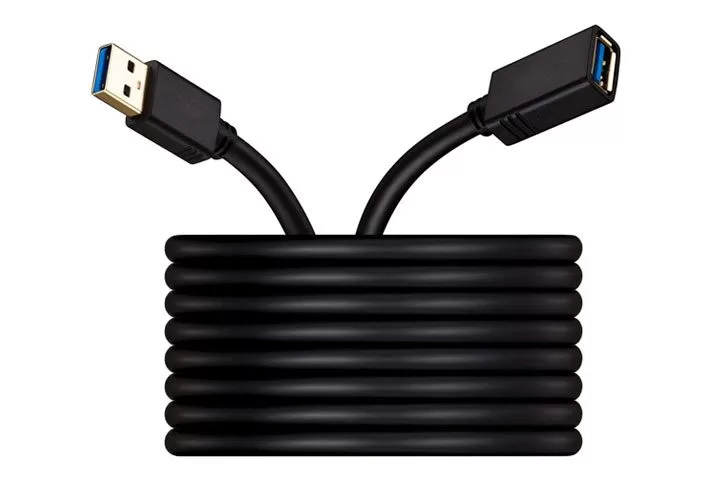
The USB 3.0 specification is deliberately vague about cable length: it defines signal quality, not metres. That is why vendors quote 5 m, 10 m and 15 m on passive cables that were never tested at those lengths. Here is where each approach actually breaks, and what to specify instead.
Why a Passive USB 3.0 Extension Cable Stops at 3 Metres
SuperSpeed signalling runs at 5 Gbps per lane over a differential pair, using 8b/10b encoding. The Nyquist frequency — the point where the cable’s attenuation curve has to still leave an open eye — lands around 2.5 GHz. At that frequency, copper attenuates fast, and the receiver’s equaliser can only recover so much.
The USB-IF certifies standard SuperSpeed cable assemblies to 3 m for exactly this reason. It is not a marketing limit; it is the length at which the eye diagram still passes with margin. Two things happen past it:
- Link training falls back. The host tries SuperSpeed, fails, and renegotiates to USB 2.0 High Speed — 480 Mbps. No error message, no yellow triangle. The device just feels slow.
- Or it trains, then drops. The link comes up at 5 Gbps and disconnects the first time the device draws a burst of current or the cable is bent. This is the failure mode that generates support tickets, because it looks like a driver problem.
| Run length | Passive copper | Active copper (re-driver) | Fiber USB 3.0 AOC |
|---|---|---|---|
| 1–3 m | 5 Gbps, certified | 5 Gbps | 5 Gbps (overkill) |
| 3–5 m | Unreliable, often 480 Mbps | 5 Gbps, needs bus power | 5 Gbps |
| 5–10 m | Does not hold 5 Gbps | At the edge; test per device | 5 Gbps, no external power |
| 10–30 m | Not viable | Not viable | 5 Gbps — our POUF-0300 range |
What the Fallback to USB 2.0 Actually Costs
Ten times the headline number, and usually more in practice — which is why a USB 3.0 extension cable that silently renegotiates is so expensive. A 4 GB video file that takes about 10 seconds over a healthy 5 Gbps link takes over a minute at 480 Mbps. An external SSD that sustains 400 MB/s drops to roughly 40 MB/s — below a spinning disk.
For a UVC camera the numbers are worse than the marketing suggests. Uncompressed 1080p60 4:2:2 sits around 1.5 Gbps, which does not fit in 480 Mbps at all, so the capture software either drops frames or silently switches to MJPEG — softer image, and the integrator gets blamed for a cable they did not specify. If your run is data-only rather than video, the same math applies to a dock uplink or a NAS sync job.
Three Ways to Actually Reach 10 Metres
1. Active copper USB 3.0 extension cable. A small re-driver chip sits in the connector shell and re-shapes the eye. It works, it is cheap, and it tops out around 5 m on USB 3.0 — some designs reach 10 m but only with a specific host chipset. It draws power from the host’s VBUS, which means the far end gets less current than a short cable would deliver. Many active designs also enumerate as a hub, which changes how the device appears to the operating system and can break firmware utilities.
2. Fiber optic USB 3.0 extension cable. The SuperSpeed pairs are converted to light at the A-end and back to copper at the far end. Because the lossy part of the route is glass, the 5 Gbps eye arrives intact at 10 m, 20 m or 30 m. This is the same architecture described in what an active optical cable is, applied to USB rather than HDMI.
3. Hub chaining. The spec allows five hubs and seven tiers, so on paper a USB 3.0 extension cable can be chained twice. In practice it fails often enough that we do not recommend it: each hub re-clocks, each hop adds latency and power loss, and the far-end device sees a different topology than the driver expects. One cable, one hop.
Four Things That Actually Fail at 10 m
Power, not data. A USB 3.0 extension cable carries VBUS on copper regardless of how the data pairs are built. USB 3.0 ports must supply 900 mA; bus-powered 2.5″ drives routinely pull close to that, and a 10 m run of thin VBUS conductors drops enough voltage that the drive browns out mid-write. The cable is fine — the budget is not. If the device needs close to the port limit, plan a powered path.
The backward-compatibility trap. A USB 3.0 device on a USB 2.0 port, or behind a USB 2.0 hub, runs at 480 Mbps and reports nothing. Before blaming a 10 m cable, confirm the port itself is blue-coded or documented as SuperSpeed, and confirm the device negotiated 5 Gbps in the OS device tree.
2.4 GHz interference. USB 3.0 signalling is broadband noise centred near 2.4 GHz — well documented since the first SuperSpeed controllers shipped. Keep long runs away from wireless microphone receivers, Zigbee coordinators and 2.4 GHz keyboard dongles, or accept dropped packets on both. Fiber is immune because the data path is glass; the copper VBUS pair still radiates, so route it away from antennas.
Direction and connector type. Every fiber USB 3.0 extension cable is directional: A-male goes to the host, the far end is A-female, C-female or Micro-B depending on the part. Ordering the wrong far-end connector is the single most common specification error we see, and it is not field-fixable.
Standard USB 3.0 Extension Cables in Comparison
| Configuration | Item number | Data rate | Length | Typical use |
|---|---|---|---|---|
| USB 3.0 A-male to A-female | POUF-0300 | 5 Gbps | 1–30 m | Camera, printer, USB drive, panel PC |
| USB 3.0 A-male to C-female | POUCF-0300 | 5 Gbps | 1–10 m | Dock uplink, laptop at the far end |
| USB 3.0 C-male to C-female | POCF-0300 | 5 Gbps | 1–10 m | USB-C host to USB-C peripheral |
| USB 3.0 C-male to Micro 10P | POCB-0300 | 5 Gbps | 5–10 m | Industrial camera, embedded module |
Every part in that table is a hybrid, and the hybrid is what makes a 10 m USB 3.0 extension cable practical. The full range sits on our USB 3.0 extension cable product page; the four configurations that cover most projects are: the SuperSpeed pairs run on fiber, while VBUS, GND and the USB 2.0 pair stay copper. That hybrid design is why they need no power supply at the display end, and also why they are data cables rather than charging cables — the current budget still follows the copper, not the light.
If your run is USB-C at both ends and carries video as well as data, the trade-offs are different and are covered in USB-C optical cable versus active copper. If you are still deciding whether you need an extension at all, how far USB 3.0 copper and fiber really reach lays out the length table behind these numbers.
How to Specify a 10 m USB 3.0 Extension Cable
- Host port type and chipset. AOC works across chipsets, but knowing the host tells us which re-driver parts to avoid if you go copper.
- Far-end connector. A-female, C-female or Micro-B. Get this wrong and the cable is scrap.
- Device current draw. Anything approaching 900 mA needs a power plan, not just a longer cable.
- Environment. Flexing in a cable chain, oil mist, UV, or a tight conduit all change the jacket and strain relief, not the optics.
- Evidence. Ask for a length-specific test report on the actual 10 m assembly — insertion loss, eye margin, and a VBUS drop measurement. A datasheet quoting “5 Gbps” is not a test report.
FAQ
Does a 10 m USB 3.0 extension cable lose speed?
A passive one almost certainly does: it either drops to USB 2.0 at 480 Mbps or disconnects under load. An active optical assembly holds 5 Gbps at 10 m because the lossy section is fiber, not copper.
Can I chain two 5 m active extension cables?
On paper yes, within the five-hub limit. In practice it fails often enough that we advise against it — each hop adds power loss and changes the topology the driver sees. Buy one cable at the length you need.
Is a USB 3.0 extension cable backward compatible?
Yes. A USB 2.0 device on the far end runs at 480 Mbps, and so does a USB 3.0 device plugged into a USB 2.0 port. Nothing is damaged; you simply lose the SuperSpeed pairs.
Do I need an external power supply?
Not for the cable itself — our fiber USB 3.0 extensions are bus-powered. You may still need a powered hub if the far-end device draws near the 900 mA port limit.
Will it work with a USB-C laptop?
Use the C-male configuration (POCF-0300) so the host side negotiates natively. A USB-A to USB-C adapter in the middle adds a connector and usually a power negotiation step you do not want at 10 m.
Next Step
Send us the host port, the far-end connector and the device you are extending, and we will tell you whether a 10 m USB 3.0 extension cable is the right answer at all, and we will confirm which part holds 5 Gbps at your length instead of quoting the nearest catalogue number. Samples of the POUF-0300 are available for evaluation, with OEM branding and custom lengths from 500 pieces — send your specification for a quote.
Related posts:
 HDMI 2.1 vs DP 2.1 Comparison Guide: Full Technical Analysis of Display Interfaces
 Market Research Report on Fiber HDMI, DisplayPort and USB Cables in Germany (2026 Edition)
 How to Choose EMI-Resistant Fiber Cables for MRI & CT Medical Imaging Systems
 DisplayPort 1.4 Cable Distance: Copper vs Fiber at 32.4 Gbps