
Short answer: at 10 metres, a passive copper USB-C cable cannot hold 10 Gbps. The USB Type-C specification caps passive 10 Gbps assemblies at about 1 metre, so anything longer is either active copper with a redriver inside, or a USB-C optical cable that converts the signal to light. Active copper buys roughly 3 to 5 metres. An AOC buys 60. The trade-off is power: the same optics that carry data 60 metres cap delivery at 5V/1.5A.
This is for whoever has to run USB-C 10 metres — to a conference display, a machine vision camera, a VR tether or a rack capture device — and needs to know which cable type survives it.
Why 10 m is the breaking point for USB-C
USB-C is a connector, not a protocol. The 24-pin shell carries USB 2.0, USB 3.2 Gen 1 at 5 Gbps, Gen 2 at 10 Gbps, USB4 at 20 or 40 Gbps, DisplayPort Alt Mode, and up to 240 W. What limits distance is the signalling standard, not the plug — and at 10 Gbps, copper loses quickly.
A 10 Gbps SuperSpeed eye diagram closes with length: high-frequency attenuation, impedance mismatch at the connector, crosstalk between pairs. The USB-IF wrote the Type-C cable spec around that, so passive ceilings are short by design.
| Protocol over USB-C | Passive copper limit | What happens beyond it |
|---|---|---|
| USB 2.0 (480 Mbps) | ~4 m | Works to 5 m on good cable; voltage drop appears first |
| USB 3.2 Gen 1 (5 Gbps) | ~2 m | Falls back to USB 2.0, or fails to enumerate |
| USB 3.2 Gen 2 (10 Gbps) | ~1 m | Retrains at 5 Gbps or drops to USB 2.0 |
| USB4 Gen 3 (40 Gbps) | ~0.8 m | Not reachable at 10 m in copper at all |
| DP Alt Mode, 4-lane HBR2 | ~2 m | Resolution or refresh drops, or no signal |
The consequence is easy to miss: an over-length passive cable often works. It enumerates, the device appears, everything looks fine — at USB 2.0 speed. A 10 m passive cable in a 10 Gbps capture chain delivers 480 Mbps, and the operator blames the camera or the driver. This is the most common false diagnosis on USB support tickets.
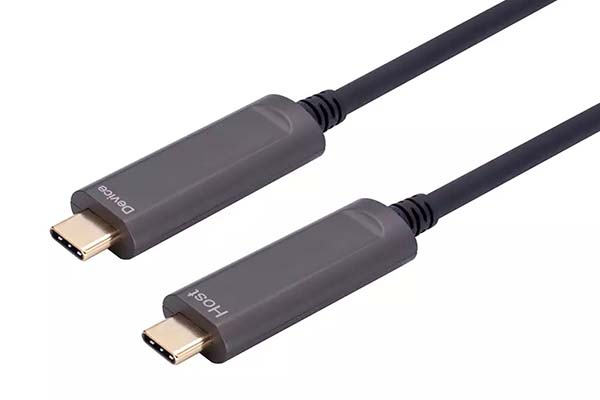
Three cable types, one 10 m run
| Passive copper | Active copper | USB-C optical (AOC) | |
|---|---|---|---|
| 10 Gbps reach | ~1 m | 3–5 m | 1–60 m |
| 18 Gbps video reach | ~2 m | 3–5 m | 1–60 m (PAHC-8800 to 100 m) |
| Power delivery | Up to 100 W with e-marker | Typically 60 W, often less | 5V/1.5A (7.5 W) |
| EMI immunity | None | Low — copper still acts as an antenna | Complete after the first conversion |
| Diameter at 10 m | Not viable | 7–9 mm, stiff | 3.0–4.5 mm |
What active copper actually does
A redriver or retimer sits in each connector, equalises the signal, re-clocks it, and pushes it a few metres further. It is cheaper than optics at short lengths. But the copper pairs are still in the cable, so the cable is still an antenna: beside a VFD, a servo drive or a switching supply, the interference that corrupts passive copper reaches the redriver too. Those chips also draw power from the host, which is why active copper rarely carries the full 100 W.
What a USB-C optical cable actually does
An AOC converts the electrical signal to light inside the connector, runs the light down a fiber core, and converts it back at the far end. After that first conversion no conductor carries the high-speed signal, so distance stops being a signal-integrity problem and becomes an optical budget problem — which is generous. Our USB-C optical cable range holds 10 Gbps to 60 m, and the 18 Gbps AV variant (PAHC-8800) runs 4K 60Hz 4:4:4 with HDR, HDCP 2.2 and CEC to 100 m.
The fiber also changes the mechanical picture. A 10 m active copper assembly is a stiff 8 mm hose that fights a 25 mm bend radius; a 10 m USB-C optical cable sits closer to a headphone cable, which matters through conduit, a cable chain or a headset tether.
For the construction and the cases where an AOC is the wrong part, see what an active optical cable is. If your run is USB-A to USB-B rather than USB-C, the equivalent numbers are in USB 3.0 cable length limits.
What “18 Gbps video only” really means
Two bandwidth figures appear on USB-C optical cable datasheets, and buyers compare them as if they were the same number. They are not. 10 Gbps is USB 3.2 Gen 2 data — storage, camera, hub, Ethernet — and it coexists with DisplayPort Alt Mode at reduced lane count.
18 Gbps is DP Alt Mode with all four high-speed lanes dedicated to video: 4 lanes at HBR2, 17.28 Gbps payload, rounded up in marketing. The catch is in the name, video only. Those are the same lanes USB 3.x needs, so a 4-lane video cable cannot also run USB 3.2 data; the USB path drops to 2.0. If the far end is a touchscreen with USB pass-through or a conference display with a camera, the 18 Gbps variant gives you the picture and a 480 Mbps hub.
That is why we list both variants rather than one “best” cable. Pick by what the far end needs:
- Data only (camera, drive, dock uplink): 10 Gbps, PUAC-3100 or PUAC-3120.
- Video plus a USB 2.0 hub (touch display, meeting room): 18 Gbps video, PCVC series.
- VR headset tether: PCRA-3100, a 90° elbow rated 5V/1.5A for headset draw.
The power trade-off nobody puts in the headline
Every USB-C optical cable on the market, ours included, caps power well below a passive cable. Our USB-C AOC lines are rated 5V/900mA to 5V/1.5A — 4.5 to 7.5 W. A passive 100 W cable with a proper e-marker carries 20V/5A.
Power cannot travel down a fiber. An AOC runs separate thin copper conductors alongside the fiber for VBUS and ground, because the design goal is a slim cable with small connectors. Thin copper at 10 m means voltage drop, and voltage drop at 5A means heat inside a connector that already holds active electronics.
So the decision is narrow and honest:
- 10 m, 10 Gbps, self-powered device (camera with its own supply, mains-powered monitor): an AOC is the only part that works.
- 10 m and the cable must charge the device: no AOC will do it. Use a shorter active copper run plus a separate power feed.
- 60–100 W at 3 m: passive copper with an e-marker is cheaper and better. Do not over-engineer.
USB Power Delivery rules live with the USB-IF, and any cable claiming 5A without an e-marker is mislabelled.
What a USB-C optical cable will not do
- It is not a Thunderbolt or USB4 cable. A 10 Gbps AOC does not tunnel PCIe, drive a Thunderbolt dock, or deliver 40 Gbps. If a laptop dock is on the far end, this is the wrong product regardless of length.
- A-to-C is directional. The Type-A end goes to the host. C-to-C assemblies are symmetric and either end can be host, but A-to-C is not; reversed, it produces a dead link that looks exactly like a broken cable.
Specifying checklist
Five lines decide whether a USB-C optical cable is even the right part:
- Protocol and speed — USB 3.2 Gen 2 at 10 Gbps, or DP Alt Mode at 18 Gbps. Write the number, not “USB-C fast”.
- Length plus 10% slack — a 10 m run through conduit is rarely 10 m of cable path.
- Power draw in watts — this single line decides whether an AOC is eligible at all.
- Connector genders and angle — A-to-C or C-to-C, straight or 90°. A right-angle plug pointing the wrong way is a non-returnable mistake.
- Bend radius and jacket — ask for the minimum radius in writing; specify LSZH for plenum or public space.
If the run is in a cabinet with drives or inverters, ask for the fiber version: interference does not reach it, and that is the difference between a link that works and one that drops frames every time a motor starts.
FAQ
Can I use a 10 m passive USB-C cable for 10 Gbps?
No. Ten metres of passive copper will not hold USB 3.2 Gen 2. It usually still enumerates at USB 2.0 speed, which is why the failure gets blamed on the device.
Is a USB-C optical cable faster than copper?
Not faster, longer. Both carry 10 Gbps. The AOC holds that rate to 60 m instead of 1 m and does not care about EMI. Bandwidth comes from the protocol, not the medium.
Will a USB-C optical cable charge my laptop?
Not at any useful rate — 5V/1.5A is enough for a bus-powered camera or a headset, not a laptop. Keep charging on a separate cable.
Next step
Send us the protocol, the length, the device power draw and the connector types. We will tell you within one working day whether it is a 10 Gbps data AOC, an 18 Gbps video AOC, or a copper cable you can buy locally for less — including when the honest answer is that you do not need our product. Samples of PUAC-3100 and PAHC-8800 are available for evaluation, with OEM branding and custom lengths from 500 pieces.
Send your specification for a quote — or compare the fiber optic USB 3.0 range if your run is A-to-B rather than USB-C.


