
Short answer: the practical USB 3.0 cable length limit on passive copper is 3 metres at 5 Gbps. Push to 10 Gbps and it falls to roughly 2 metres. Beyond that the link does not usually die outright — it renegotiates down to USB 2.0 speeds, or drops out under load. A fiber optic active optical cable carries the same 10 Gbps link to 60 metres without a repeater.
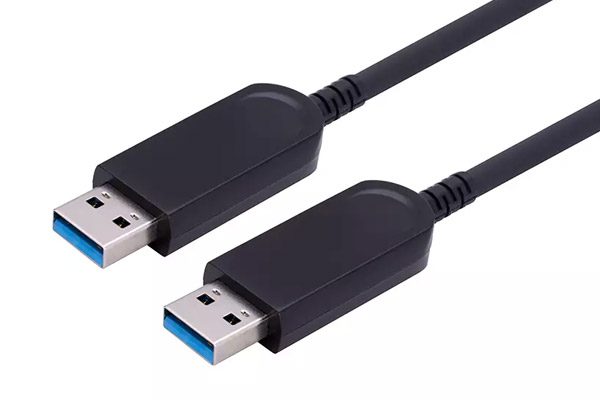
The number matters because most USB problems in the field are blamed on firmware, drivers, or the camera, when the actual cause is a 5 m passive cable running a 5 Gbps link. This page covers where the USB 3.0 cable length limit comes from, how it fails, and what to specify instead.
Why the USB 3.0 cable length limit is 3 metres
USB 3.0 SuperSpeed runs 5 Gbps on a single differential pair, with 8b/10b encoding — about 500 MB/s of payload. The USB-IF cable specification sets 3 m as the maximum for a standard passive SuperSpeed cable, and that figure is not arbitrary. It is the length at which a compliant cable still meets the insertion-loss budget the receiver is designed to equalise.
Three effects combine at 5 Gbps:
- Skin effect. At 2.5 GHz, current crowds to the conductor surface. The effective cross-section shrinks, so resistance rises with frequency and the high-frequency content of the signal is attenuated first.
- Dielectric loss. The insulation absorbs energy in proportion to length. Cheap PVC insulation loses more than foamed PE or FEP.
- Impedance discontinuities. Every connector, every crimp, every tight bend is a small reflection. One reflection is harmless; a chain of them at 3 m plus 5 m is not.
The receiver has a fixed equalisation budget. Once the eye closes below what that budget can recover, the link trainer gives up — and by design, it gives up by falling back rather than failing loudly.
How a USB 3.0 cable length problem actually shows up
This is what makes over-length cables so expensive in practice: they rarely announce themselves.
- Silent speed fallback. The device enumerates, works, and copies at 35 MB/s instead of 400 MB/s. Nothing in the OS says “your cable is too long”.
- Intermittent enumeration. Fine on the bench, missing after a reboot. Often temperature-dependent, which is why it appears in the afternoon when the rack is warm.
- Brown-out under load. The drive spins up, draws 900 mA, the rail sags, and the device re-enumerates. Looks exactly like a failing drive.
- Dropped frames. On a machine vision or USB camera link, you get corrupted frames rather than a disconnect — the hardest failure to diagnose.
The power half of that list is worth its own paragraph. USB 3.0 allows 900 mA at 5 V, and the spec requires at least 4.4 V at the device. That leaves a 0.6 V budget for the whole cable. With 24 AWG power conductors (about 0.084 Ω/m), a 3 m run costs roughly 0.45 V at full load — tight but workable. With 28 AWG (0.213 Ω/m) the same run costs closer to 1.1 V, and the device browns out long before signal integrity becomes the issue. Two cables with identical signal performance can behave completely differently because of the power conductor gauge. In practice, that gauge decides the usable USB 3.0 cable length as often as signal integrity does.
Copper, active copper, and fiber: what each one buys you
There are three ways to go past 3 metres, and they are not interchangeable:
- Passive copper (to 3 m). Cheapest, thinnest, no electronics, nothing to fail. Correct choice for anything on a desk.
- Active copper (to about 5–10 m). A redriver chip in the connector re-shapes the eye. Works, but the chip needs power from the host port, adds a failure point, and the cable stays thick and stiff. At 10 Gbps the usable gain is small.
- Fiber AOC (to 60 m). A transmitter in the source connector converts the electrical signal to light, four fiber strands carry it, a receiver converts it back. The copper in the cable exists only for power and a few centimetres at each end.
Once the USB 3.0 cable length passes 3 m, an AOC turns distance into a power problem rather than an attenuation problem — which is a much easier problem to solve. Signal integrity is no longer length-dependent, and the link is immune to the EMI that plagues USB in industrial cabinets, next to VFDs, or on a rack with switching supplies. The same three-way comparison over the USB-C connector is in USB-C optical cable vs active copper at 10 m, and the underlying mechanism is in what an active optical cable is.
USB 3.0 cable length by type
Typical figures for a compliant cable at each speed. Treat these as planning numbers, not guarantees — the only figure that counts is the one on the test report for your part number.
| Link | Bandwidth | Passive copper | Active copper | Fiber AOC |
|---|---|---|---|---|
| USB 2.0 High Speed | 480 Mbps | 5 m | 10 m | 30–60 m |
| USB 3.0 / 3.1 Gen 1 | 5 Gbps | 3 m | 5–8 m | 60 m |
| USB 3.1 Gen 2 | 10 Gbps | 2 m | 3–5 m | 60 m |
Note the asymmetry between signal and power at long lengths. A 60 m USB 3.0 AOC is specified at 5 V / 900 mA maximum output — the same as the port. It will run a camera, a capture device, or an industrial sensor. It will not fast-charge a laptop, and it will not run a 2.5-inch drive that spikes above 900 mA on spin-up.
What a fiber USB cable will not fix
An AOC solves distance and interference. It does not solve these, and expecting it to is how projects lose a week:
- Power delivery. No USB-PD, no 60 W charging, no bus-powered device that draws more than the port guarantees. If the endpoint needs real power, run power separately.
- A weak host controller. If the root hub cannot supply 900 mA on the port you are using, a better cable will not create it.
- Field termination. Length is fixed at order time. You cannot cut and re-terminate an AOC, and a crushed fiber is a dead cable — minimum bend radius is around 20 mm on a typical 4.0 mm jacket.
- Direction. USB AOCs are directional. The connectors are marked; plugging in reverse gives you nothing at all, not a slow link.
How to specify a long USB 3.0 run
- Write down the real bandwidth need. A 5 Gbps USB 3.0 cable and a 10 Gbps part are different products, and they do not share the same USB 3.0 cable length limit. Over-specifying costs money; under-specifying costs a site visit.
- Measure the route, not the room. Add for bends, service loops, and the path through conduit. A 12 m straight line is often a 20 m pull.
- Check the endpoint’s current draw. If it exceeds 900 mA at any point — including spin-up — plan for local power.
- Confirm the connector genders you actually need. A-to-A, A-to-B, A-to-Micro-B and panel-mount female ends are all standard options, but they are separate part numbers.
- Ask for the eye diagram at the specified length. A vendor who can produce one has tested the cable. A vendor who only quotes “supports USB 3.0” has not.
FAQ
Can I use a 10 m passive USB 3.0 cable?
You can buy one, and it may even enumerate. It will not hold 5 Gbps. A passive USB 3.0 cable length of 10 m typically negotiates down to USB 2.0, so you get 480 Mbps and assume the drive is slow. If you need 10 m at SuperSpeed, use an AOC.
Does a longer USB 3.0 cable reduce charging speed?
Yes, on passive copper. Voltage drop across the power conductors reduces current at the device, so charging slows and some devices refuse to charge at all. An AOC avoids the drop but is still limited to 900 mA output — it is not a charging cable.
Is a USB 3.0 AOC backward compatible with USB 2.0 devices?
Yes for data. The AOC carries the SuperSpeed pair and the USB 2.0 pair, so a USB 2.0 device works on the same cable at 480 Mbps. Check the datasheet if you depend on it — a few low-cost designs carry SuperSpeed only.
Why does my 5 m USB 3.0 cable work on one PC and not another?
Equalisation budget differs between host controllers, and so does the +5 V rail under load. A marginal cable that passes on a desktop port can fail on a laptop port or through an unpowered hub. That is the signature of a link running at the edge of its budget, not a software fault.
Next step
If your USB 3.0 cable length requirement is beyond 3 metres and you need SuperSpeed rather than a fallback, passive copper is the wrong part. Our fiber optic USB 3.0 cable range covers 10 Gbps from 1 to 60 m in A-to-A, A-to-B, A-to-Micro-B and panel-mount female versions, with OEM branding and custom lengths.
Tell us the device, its current draw, the route length and the connector types — we will come back with the right part number and a test report at that length. Request a quote.


