
Short answer: yes — but only inside the bend radius printed for your specific cable. A fiber optic HDMI cable (HDMI AOC) is far more flexible than a copper HDMI cable, yet the glass strands inside still break if you fold them, cinch them with a zip tie, or pull them around a tight conduit elbow. The jacket can look perfect while the fiber has already fractured, and the symptom is intermittent sparkles, dropouts, or no picture at full bandwidth. Treat the datasheet number as a hard limit, separate the pulling radius from the installed radius, and test the link at its final resolution before the wall goes up.
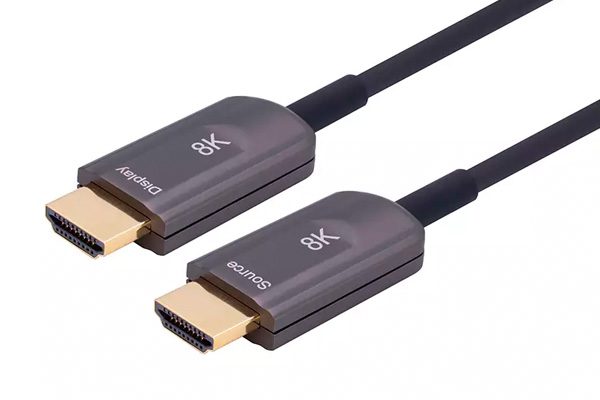
“Can you bend fiber optic HDMI cable?” is usually asked after a bench test passed and the wall run failed. The cable worked on the floor, then went into a conduit or behind a plate — and came back flickering. That pattern points to installation stress, not a bad cable. Here are the numbers, the usual failure points, and a check that saves a second pull.
What actually breaks when you bend an HDMI AOC
An AOC converts the HDMI signal to light at the source end, carries it on four 50 µm fiber strands, and converts it back at the display. Copper alongside carries +5 V, EDID and low-speed side channels. That construction explains both the flexibility and the fragility.
- Glass does not stretch. Bend it past its limit and microscopic cracks form. The jacket keeps its round shape, so the cable still looks new.
- Loss rises before the picture dies. A stressed bend adds attenuation first at long wavelengths. The link may hold 1080p, flash at 4K60, and fail outright at 4K120 or 8K — which is why people blame the display.
- Movement makes it intermittent. Vibration or a settling cable shifts a marginal bend — the classic “worked for six months, then black screen” report.
- Connector boots are the other weak point. A hard 90° turn at the strain relief stresses the fiber-to-chip bond. An AOC cannot be re-terminated in the field — a crushed fiber means a new cable.
None of this is an argument against AOC. It is an argument for treating the radius as a specification, not a feeling.
How tight is too tight? The numbers that matter
There is no single universal number: the limit depends on fiber grade, jacket and armor. Generic fiber practice uses a multiple of the cable’s outer diameter (OD); some slim HDMI AOC datasheets quote a fixed long-term figure. Keep the two states separate:
| Condition | Common guidance | Example on a 4 mm slim jacket | What to do on site |
|---|---|---|---|
| While pulling through conduit | ≈20 × cable OD | ≈80 mm radius (160 mm loop) | Use sweeping bends and pulling lubricant; never yank around an elbow. |
| After installation (static) | ≈10 × cable OD | ≈40 mm radius (80 mm loop) | Keep the route open; do not compress the slack behind a plate. |
| Slim HDMI AOC long-term figure | Fixed figure on some datasheets, e.g. ≈20 mm | ~5 × OD — tighter than the generic rule | Use it only if your exact SKU’s datasheet states it. The manufacturer’s number wins. |
| Armored / super-slim construction | Varies by model | Not inferable from the standard cable | Ask for the radius of the armored SKU before specifying a tight route. |
| Zip tie, staple, or door jamb | Point load — no radius rule applies | Avoid entirely | Use hook-and-loop straps, loosely, with room for the cable to move. |
Our AOC overview mentions roughly 20 mm on a typical 4.0 mm jacket as a long-term figure — an illustration, not a blanket PNA spec. Bend performance differs between standard, armored and super-slim variants. For a submittal number, ask us for your part number’s datasheet.
The five places an in-wall run gets damaged
- Behind the wall plate. The “service loop” gets pushed into a shallow box until the cable folds on itself. Leave a broad loop, not a coil.
- The first 100 mm out of the connector. A right-angle adapter or tight rack exit concentrates the bend at the strain relief. Move the plate, or specify a connector variant that fits.
- Conduit elbows and stud holes. A sweep that accepts copper can still be too sharp for fiber under pull tension. Pull with a broad radius; do not drag the plugs through the bend.
- Cable ties and staples. A cinched tie crushes the jacket into the fiber. Use hook-and-loop, never staples.
- The final dress. The cable tests fine lying loose, then fails once tied down. Dress it first, retest, then close the wall.
On a video wall or in a control room, bend control is also a maintenance issue: tight cables cannot be moved later without risking the fiber. Leave slack and label both ends. An AOC is directional — Source end to the player or PC, Display end to the screen. Why fiber HDMI cables are directional covers the failure mode.
Fiber AOC vs copper: which tolerates a tight route?
| Factor | Passive copper HDMI | Fiber HDMI AOC |
|---|---|---|
| Cable diameter | Thick and stiff, especially at 48 Gbps | Slim and light; easier through 25 mm conduit |
| Typical radius behavior | Kinks and holds a new shape; may recover electrically | Tiny radius while healthy; permanent fiber damage if exceeded |
| Practical reach at 48 Gbps | About 2–3 m | 1–100 m, full format at the rated length |
| EMI near mains and motors | Can pick up noise | Immune — no electrical signal in the fiber |
| Repair after crush or kink | Possibly re-terminable | Not field-repairable — replace the cable |
The trade-off is straightforward. At 15 m, copper is not an option at full HDMI 2.1 bandwidth anyway, so a correctly routed AOC is the only single-cable answer. At 2 m, passive copper is simpler. Our fiber optic HDMI AOC range covers 1–100 m in HDMI 2.0 (18 Gbps, 4K60 4:4:4) and HDMI 2.1 (48 Gbps, 8K30 4:4:4 / 8K120 with DSC), including armored and super-slim armored builds for rougher routes. Choosing the construction for the route matters more than forcing the thinnest cable into the tightest hole.
Five-minute check before you close the wall
- Measure. Note the cable OD and tightest curve; compare with the SKU datasheet radius.
- Test at the final format. Use the real source and display at the intended resolution and refresh rate — 1080p proves little for an 8K or 4K120 run.
- Dress, then retest. Fit the cable at its final radius with hook-and-loop ties and run the same signal for ten minutes.
- Move it deliberately. Shift the cable at the tightest point. A picture that drops out means a marginal cable — replace it before the drywall.
- Label both ends and photograph the route. See HDMI AOC troubleshooting if the link is already down.
FAQ
Can I bend a fiber HDMI cable 90 degrees?
Not as a sharp corner. The radius of that corner must stay above the cable’s minimum — a 90° turn with a 40 mm radius is fine for a cable rated accordingly; a 90° fold with a 5 mm radius is not. The connector boot should never take the turn.
Does a smaller cable bend better?
Usually, because the generic radius rule scales with OD. But construction matters: an armored slim cable may be tougher yet less flexible than an unarmored one of the same diameter. Check the figure for the exact model.
Will a tight bend increase latency?
No. A stressed bend causes loss and link instability, not delay. The conversion in an AOC adds nanoseconds regardless of the route; our latency breakdown puts that number next to a video frame.
Can a kinked fiber HDMI cable be repaired?
No. The fiber-to-transceiver bond is not field-serviceable. If a bend has caused persistent dropouts, replace the run. This is also why the exact certification and test data on a cable matter when you buy for a permanent installation.
Next step
Tell us the source, display, format and route — including the tightest bend and any conduit. We will recommend a standard, armored or super-slim HDMI AOC, confirm that part’s radius, and quote the length you need. Custom lengths start at one sample. Request a quote or a sample.
Related posts:
 Market Research Report on Fiber HDMI, DisplayPort and USB Cables in Germany (2026 Edition)
 How to Choose EMI-Resistant Fiber Cables for MRI & CT Medical Imaging Systems
 Medical Cable Sterilization Standards: Autoclavable & Disinfectable AOC for Clinical Use
 USB 3.0 Cable Length: How Far Copper and Fiber Really Reach