
Short answer: when an HDMI AOC not working situation lands on our desk, nine times out of ten the cable is fine. The fault is direction (plugged in backwards), power (the source port cannot deliver enough on +5 V), or HDCP (the handshake fails through an AV receiver or splitter). Work through those three before you cut the cable out of the wall.
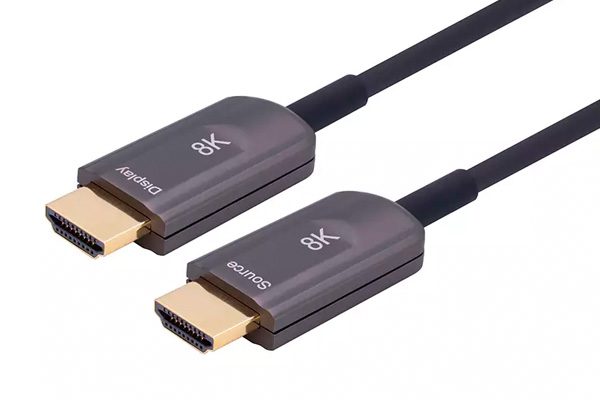
This page is the order we run on every HDMI AOC not working ticket, from the cheapest check to the most expensive. It applies to 18 Gbps and 48 Gbps fiber HDMI cables alike, and to armored, slim and micro-connector variants — the HDMI 2.1 specification governs the electrical side of all of them.
HDMI AOC Not Working: Seven Reasons, In Order
1. The cable is plugged in backwards
An AOC is not a passive cable. Each end contains a transmitter or a receiver, and they cannot swap roles. Source goes to the source, display goes to the display — and the labels are printed on the connector housings for exactly this reason.
Reversed direction produces a completely dead link: no picture, no EDID, no hot-plug detect. It looks identical to a broken cable, which is why it is the first thing to eliminate. A reversed cable is the single most common cause of HDMI AOC not working after a renovation, when the cable came out and went back in.
2. The source port is not delivering +5 V
The AOC is self-powered from the HDMI +5 V rail. The HDMI specification only guarantees 50 mA on that pin, and a 48 Gbps AOC draws close to that budget. Weak or non-compliant sources are common:
- Matrix switchers and splitters that share one +5 V rail across eight outputs
- Cheap extenders and HDMI-over-IP receivers
- USB-C to HDMI dongles, which often budget power for the HDMI chip and little else
- Laptop ports in power-saving states
Test by moving the source end to a different device — a set-top box or a known-good laptop. If it lights up there, the cable is fine and the port is the problem. For installations where the port will not cooperate, specify a powered AOC variant.
3. The HDCP handshake is failing through an AVR or splitter
An AOC is transparent to HDCP, but transparent is not the same as invisible. The cable is a repeater in the HDCP topology, and every repeater in the chain has to complete the handshake within the timing the source expects. Add an AV receiver with a slow EDID read, or a splitter with an old HDCP revision, and the chain times out.
The symptom is specific: a flash of picture, then a black screen, or an error message from the source about an incompatible display. Bypass the AVR — source straight into the display through the cable — and see if the picture holds. If it does, the cable is not the fault.
4. A 4K60 cable is being fed an 8K60 signal
An 18 Gbps AOC and a 48 Gbps AOC look identical from the outside and cost different money. The 18 Gbps part is specified for 4K60 at 4:4:4. Feed it 8K60 or 4K120 and it will not pass the signal — not because it is defective, but because the link has roughly 40% less bandwidth than the format requires.
Check the part number against the datasheet before assuming a fault. If the source is outputting 8K60 and the cable is an 18 Gbps model, the fix is the cable, not the settings.
5. The fiber is broken inside the jacket
Fiber survives tension, but not a tight radius. Pull a cable around a 10 mm corner, step on it under a carpet, or zip-tie it to a truss and you can crack a strand while the jacket looks perfect. The link then fails intermittently — working cold, failing warm, or failing only when the cable hangs at a particular angle.
Minimum bend radius on a typical 4.0 mm AOC jacket is around 20 mm. If the cable was pulled through conduit with sharp bends, or coiled tightly for transport, treat damage as a real possibility. The flex test is simple: gently move the cable along its length while watching the display. A picture that cuts in and out at one point localises the break.
6. The connector is not fully seated
Standard HDMI connectors need about 5 mm of travel to seat, and they do not click. Micro Type-D connectors are worse — they are small enough that a partially inserted plug feels inserted. Lock-screw variants solve this for permanent installs, but only if the screws are actually tightened.
Also check the port itself. A worn HDMI port on a display, or a port that has been stressed by a heavy cable hanging off it, can fail to make contact on the TMDS pairs while still passing +5 V. That combination — power present, no picture — points at the connector, not the fiber.
7. EDID is not being read
The source asks the display what it supports before it sends anything. If that read fails, most sources fall back to a safe default — often 640×480 or 1080p — or output nothing at all. Long cable runs, KVM switches and splitters without EDID management are the usual causes.
Force a resolution on the source, or power-cycle in the right order: display on first, then source. If a fixed resolution restores the picture, the cable is passing data but the EDID path is marginal.
Symptom-to-cause reference
| Symptom | Most likely cause | First test |
|---|---|---|
| Completely dead, no hot-plug detect | Reversed direction, or no +5 V | Check Source/Display labels, swap source device |
| Picture flashes then goes black | HDCP handshake timeout | Bypass the AVR or splitter |
| Works at 1080p, fails at 4K60 | Bandwidth mismatch or marginal link | Confirm cable rating against format |
| Sparkles, dropouts, occasional black frames | Cable at the edge of its length/bandwidth | Test a shorter certified cable |
| Fails only when moved or warm | Damaged fiber or connector | Flex test along the run |
| No audio, picture fine | eARC / CEC not supported on this part | Check datasheet for eARC support |
What is not the cable’s fault
Before you open an HDMI AOC not working case with your supplier, check these. They are real failures, but the AOC is not the cause:
- eARC and CEC. Not every AOC passes every side-channel feature. If your design depends on eARC, that has to be a specified requirement, not an assumption.
- VRR and ALLM. These depend on the source and display agreeing; an AOC that passes 48 Gbps may still not carry a feature one of the endpoints does not implement.
- Long-run power. Beyond roughly 30 m, some sources cannot sustain the current the far-end receiver needs. The fix is a powered variant, not a different brand.
A 5-minute diagnostic order
Run these in sequence. Most HDMI AOC not working cases resolve at step 2 or 3, before anything gets unscrewed from a wall.
- Read the labels. Source to source, display to display.
- Bypass every intermediate device. Source and display, nothing else.
- Swap the source for a known-good one. Swap the display if you can.
- Confirm the cable’s bandwidth rating against the format you are sending.
- Flex test along the run, watching for dropouts.
- Only then conclude the cable is faulty — and ask for a replacement, not a redesign.
FAQ
Why is my HDMI AOC not working on one TV only?
Almost always EDID or HDCP. The second display requests a format or a handshake the chain cannot complete. Test the same cable on a third display before blaming the cable.
Can I reverse an HDMI AOC by using an adapter?
No. An adapter cannot turn a receiver into a transmitter. If the cable is installed the wrong way round, the cable has to come out.
Do fiber HDMI cables need external power?
Normally not — they draw from the source’s +5 V rail. Runs beyond about 30 m, or sources with weak HDMI power output, may need a powered version. Check before the cable goes into conduit.
Is a dead AOC repairable?
No. The fiber-to-chip bond inside the connector is not field-serviceable. This is why the direction check and the power check matter so much: they are the two failures that look like a dead cable and are not.
Next step
If you have worked through the list and your HDMI AOC not working problem traces back to the cable, or if you are specifying a new run and want to avoid these failures altogether, our fiber optic HDMI AOC range covers 18 Gbps and 48 Gbps from 1 to 100 m, in standard, armored, slim and micro Type-D versions, with direction clearly marked and OEM branding available.
Send us the source device, the display, the format you are sending and the run length — we will tell you which part number holds that format at that length, and back it with a test report. Request a quote.
Related posts:
 Understanding the Superiority of Pure Optical Fiber HDMI 2.1 Cables with MPO Connectors for 8K Transmission Over 500 Meters
 In fiber HDMI cabling projects(Wiring ducting), if the cable is accidentally routed backwards,how to solve?
 Fiber hdmi 2.1 cable or copper hdmi 2.1 cable which one is better ?
 Analysis of the application of HDMI cables in data centers