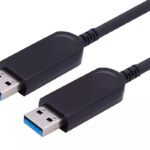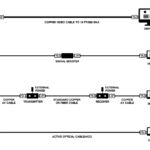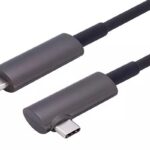
Short answer: yes. Every fiber optic HDMI cable is directional, because the two ends are not the same hardware — one end converts the electrical HDMI signal into light, the other converts light back into electricity. A transmitter cannot act as a receiver. Plug the cable in backwards and the high-speed lanes go dark: you get no picture, or a black screen that still reports the correct resolution.
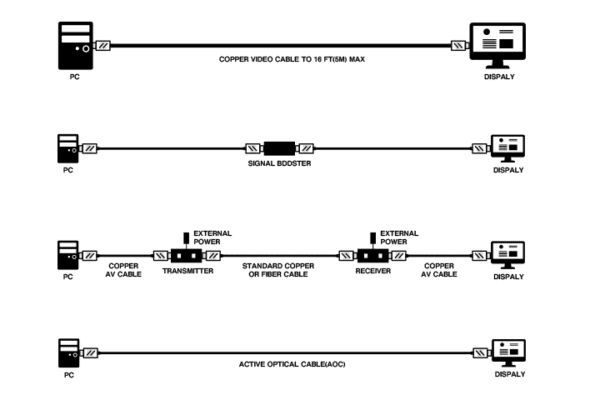
This is not a limitation anybody designed in for convenience. It falls directly out of how an active optical cable works, and once you see the reason, the practical rules for installers and procurement teams become obvious. If you want the wider construction picture first, it is set out in what an active optical cable is.
The Mechanism: A Transmitter at One End, a Receiver at the Other
The source end carries a transmitter, the display end carries a receiver
Inside the source connector there is a small laser diode and its driver. Electrical HDMI lanes arrive, the driver modulates the diode, and the data leaves as light pulses down four fibers — one fiber per high-speed lane. Inside the display connector there is a photodiode and a transimpedance amplifier that turn those pulses back into electrical HDMI.
The electrical side of all of this is governed by the HDMI 2.1 specification; the optical conversion happens outside it. A laser cannot detect light, and a photodiode cannot emit it. There is no negotiation, no auto-sensing, and no fallback mode. The two ends are different parts with different jobs, so the cable has a fixed orientation the same way a pair of gloves does — every fiber optic HDMI cable is built this way, from 1 m patch cords to 100 m runs.
The copper inside the cable is what makes it confusing
A fiber optic HDMI cable is a hybrid. Only the four high-speed lanes travel as light. The low-speed and control conductors stay copper: +5 V power, hot-plug detect, the DDC pair that carries EDID and HDCP, CEC, and the utility line. Those copper wires are electrically continuous in both directions.
That split is the reason a reversed cable does not always look like a dead cable. On many builds the +5 V and DDC path still works when the cable is the wrong way round, so the source can power up, read the display’s EDID, and even offer the right resolution — while every pixel fails to arrive. Installers lose hours to this, because the source insists a display is connected. The full symptom list, in the order we check it, is in why an HDMI AOC is not working.
What Reversing One Actually Does
Two symptoms, depending on how much of the control path survives the swap:
No signal at all
The display reports nothing connected, the source sees no sink, and some TVs drop straight to “no signal” with a black screen. This is the cleaner failure — it points at the cable immediately.
Black screen with the right resolution showing
Worse, because it looks like a settings problem. The source has read EDID over copper, knows the display is 4K or 8K capable, and outputs that format. Nothing reaches the panel because the optical lanes are dead. You will often see the correct mode listed in the graphics driver while the screen stays black. Reversing the cable is the fastest explanation to rule out.
Direction by Cable Type
| Cable | High-speed path | Direction | Result if reversed |
|---|---|---|---|
| Passive copper HDMI | Copper, all lanes | Bidirectional | Works either way — no source or display end |
| HDMI 2.0 AOC, 18 Gbps | 4 fibers, source to display | One way | No picture; EDID may still read |
| HDMI 2.1 AOC, 48 Gbps | 4 fibers, source to display | One way | No picture; FRL link never trains |
| DisplayPort 1.4 AOC | 4 fibers, source to display | One way | No picture; main-link training fails |
| USB 3.0 AOC | 2 fibers, one per direction | One way (host end fixed) | Device never enumerates |
The pattern holds for every fiber optic HDMI cable and every DisplayPort AOC we build. DisplayPort behaves the same way as HDMI for the same reason: the main link is optical and one-way, while the AUX channel stays copper. USB is the odd one out — it genuinely carries data in both directions, so a USB AOC needs two fibers, one for each direction. It is still directional in practice, because one end is built as the host port and the other as the device port.
How to Tell Which End of a Fiber Optic HDMI Cable Goes Where
Read the connector housing
Every AOC we ship is marked at both ends — usually “Source” and “Display”, sometimes “PC” and “TV”, sometimes a printed arrow. On standard Type-A shells the marking is a moulded-in caption you can read without a torch. On micro Type-D and super-slim builds the shell is small enough that the marking sits on the overmould, so read it before the cable goes into a conduit, not after.
Watch for the four places installers get it wrong
Wall plates and floor boxes. The pigtail behind the plate is fixed during first fix. If the run is pulled the wrong way round, no amount of swapping at the faceplate fixes it — the plate has to come off and the cable re-pulled.
Matrix switchers and AV-over-IP endpoints. A matrix has inputs and outputs, and every cable from an output port to a display must have its source end at the matrix. Staging teams that treat output ports as “just HDMI sockets” create exactly this fault.
KVM switches and USB-C docking stations. A dock’s HDMI or DisplayPort output is a source. Technically it is a small box with no screen, which is why it gets plugged in wrong.
Ceiling projectors. The projector end is the display end, even though the projector is the device being installed last and the cable is often handed up first. Mark the projector end before it leaves the floor.
Can You Just Flip It Back?
Yes, and it does no harm. Reversing a fiber optic HDMI cable does not damage the optics, the source or the display — the photodiode simply never sees light. What wears out is the connector, not the electronics. Repeated mating of a Type-A shell is rated for a finite number of cycles, and the small Type-D shells are more delicate than they look, so unplug once, get the orientation right, and leave it.
What you cannot do is extend one. An AOC is a single continuous assembly with the optics bonded inside each connector, so a coupler in the middle breaks the optical link rather than extending it. If the run is short, order the correct length; if the run is long, order the correct length. There is no field-terminated HDMI AOC, and there is no bidirectional adapter that turns one around.
Five Rules That Keep a Fiber Optic HDMI Cable Run Out of Trouble
For anyone specifying cable for a tender or a fit-out, direction is a one-line item that prevents a whole category of callbacks:
- Rule 1 — Mark both ends before the pull. Tape and a marker at each end, source and display, in the same handwriting. Labels applied after the pull are guesses.
- Rule 2 — Order per run, not per site. A fiber optic HDMI cable is built to length and bonded at both connectors, so a single 100 m coil cannot be cut into three drops or re-oriented later. The part numbers differ by length anyway — our fiber optic HDMI AOC range runs 1–100 m in 18 Gbps and 48 Gbps, standard, armored, slim and micro Type-D.
- Rule 3 — Add a spare drop to any concealed route. Once the ceiling is closed, a reversed cable is a demolition job, not a service call.
- Rule 4 — Check the return path at specification stage. eARC needs its own return path, and not every 48 Gbps build provides one. If the project carries audio back to a receiver, say so before the part number is fixed.
- Rule 5 — Match the format to the length. Direction is the first thing that kills a long run; bandwidth is the second. The relationship between distance and format is covered in how far an 8K HDMI cable can run.
Questions We Get Asked
Is there such a thing as a bidirectional fiber optic HDMI cable? Not in AOC form. Passive copper is bidirectional because copper is copper in both directions; an optical assembly is not. If a project needs a signal to travel both ways between two devices, it needs two cables or a switcher.
Will plugging it in backwards damage anything? No. The optics stay dark and nothing sees a signal. Damage comes from forcing a connector or from a bent cable, not from wrong-way insertion.
Why did it work before the renovation? Because it was never reversed before the renovation. Cables get unplugged for painters, re-coiled by a different trade, and re-connected by whoever is on site that day.
Does the same apply to DisplayPort AOC? Yes, with the same symptom — a dead main link while the AUX channel may still respond. Our DisplayPort 1.4 AOC range is marked the same way for that reason.
Next step
If you are specifying a run and want the direction, length and format confirmed against a real part number before the tender closes, send us the source device, the display, the format you need and the run length. We will come back with the fiber optic HDMI cable that holds that format at that length, plus a test report and a sample if you need to prove it on site.
Request a quote or a sample — 0 MOQ on samples, custom lengths and OEM branding available.