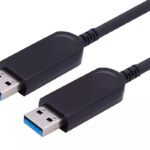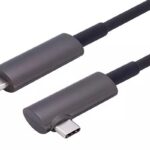
Short answer: an active optical cable is a cable that converts the electrical signal to light inside the connector, carries it over fiber, and converts it back at the other end. It exists because copper stops working long before the devices on either end do. The conversion is not a booster bolted onto a copper cable — it is a different transmission medium, and that changes what the cable can do.

If you specify AV or data cabling, you have probably been offered an AOC as an upgrade without a clear explanation of what you are buying. This page covers the construction, how it differs from the three alternatives it gets confused with, and the cases where it is the wrong choice.
What is inside an active optical cable
Four parts, in order from the source end:
- A transmitter. A small chip takes the electrical signal, cleans it up, and drives a light source — usually a VCSEL for multimode fiber.
- Fiber strands. Typically four for an HDMI or DisplayPort link: one per high-speed lane. The core is 50 µm multimode, and the whole bundle is thinner than a charging cable.
- A receiver. A photodiode converts light back to electrical signal, and a driver re-transmits it in the format the display or host expects.
- Copper conductors. A hybrid construction runs copper alongside the fiber for power and low-speed side channels — +5 V for HDMI, the auxiliary channel for DisplayPort, VBUS and the USB 2.0 pair for USB.
That last point is what makes an AOC self-powered: the cable takes a small amount of current from the source’s own connector. It is also why an AOC is directional. A transmitter cannot act as a receiver, so one connector is permanently the source end and the other permanently the display end.
Active optical cable vs the three alternatives
These four products get quoted against each other constantly, and they are not substitutes:
| Type | How it works | Practical reach | Thickness | EMI immunity |
|---|---|---|---|---|
| Passive copper | Bare conductors | 2–5 m depending on bandwidth | Thick | None |
| Active copper | Redriver chip in the connector | 5–10 m | Thick | None |
| Copper extender (tx/rx pair) | Electronics at both ends, copper between | 30–100 m over Cat cable | Two boxes + cable | Some |
| Active optical cable | Optical transceivers in the connectors, fiber between | 60–100 m typical, longer on request | Thin | Complete |
The extender row is the one that catches people out. A copper extender reaches similar distances for less money, but it adds two powered boxes, two more failure points, and a power outlet at each end. An AOC replaces all of that with a single cable that needs no separate power supply — which is usually why it wins on a project even when the unit price is higher.
Does the conversion add latency?
Effectively no. Light travels through fiber at about 5 nanoseconds per metre, so 100 m costs roughly 0.5 microseconds. The conversion electronics add a few nanoseconds per end. Compare that with a single frame at 60 Hz, which is 16.7 milliseconds — four orders of magnitude larger.
For live video, control rooms, and confidence monitoring, an active optical cable is not a latency concern. Where latency does matter — broadcast contribution, some industrial triggering — the number to ask for is the cable’s own figure, not a general claim, because designs differ.
When an active optical cable is the right answer
- The run exceeds what copper can hold. Above 3 m at 48 Gbps HDMI, above 2 m at DisplayPort HBR3, above 3 m at USB 3.0, copper is done.
- The route is EMI-hostile. Next to mains cable, VFDs, motors, LED drivers, or inside a metal cabinet. Fiber is dielectric and picks up nothing.
- Conduit is tight. A 20 m AOC is roughly the diameter of a charging cable and pulls through 25 mm conduit with bends. A copper assembly of the same length will not.
- The installation moves. Rental staging, temporary events, pop-up medical imaging. Thin, light cable survives handling that thick copper does not.
- Signal quality has to be predictable. There is no length-versus-bandwidth cliff inside the rated length. A 100 m run behaves like a 2 m run.
When it is the wrong answer
- Short runs. Under 2 m, a passive cable is cheaper, thinner, and has no electronics to fail. There is no benefit to fiber at desk length.
- Field termination. Length is fixed at order time. You cannot cut, re-terminate, or repair an AOC on site — a crushed fiber is a dead cable.
- High-power delivery. A USB AOC is limited by what the host port supplies — typically 5 V / 900 mA. It is not a 60 W charging cable.
- Very tight radii. Around 20 mm on a typical 4.0 mm jacket. Below that, fiber breaks while the jacket still looks intact.
- Reversed direction. If the installation cannot be labelled and checked, an AOC will eventually be plugged in backwards. Plan for it.
Which active optical cable do you need
The protocol decides the part, not the length. Each interface — HDMI, DisplayPort, USB — sets its own bandwidth ceiling and its own connector options:
| Interface | Bandwidth | Typical reach | Watch out for |
|---|---|---|---|
| HDMI 2.1 | 48 Gbps | 1–100 m | 8K60 4:4:4 needs DSC; check eARC support |
| HDMI 2.0 | 18 Gbps | 1–100 m | 4K60 4:4:4 ceiling — not an 8K part |
| DisplayPort 1.4 | 32.4 Gbps (HBR3) | 1–100 m | DSC for 8K60; MST shares the link |
| USB 3.0 / 3.1 | 5–10 Gbps | 1–60 m | 900 mA power ceiling; directional |
| USB-C | 10–18 Gbps | 1–100 m | Data-only vs video variants are different parts |
Our own ranges follow that split: fiber HDMI AOC in 18 Gbps and 48 Gbps from 1 to 100 m, fiber DisplayPort 1.4 AOC at HBR3 to 100 m, fiber USB 3.0 AOC at 10 Gbps to 60 m, and USB-C optical cable in data and video variants.
Each interface has its own hard distance limit, set by physics rather than marketing, and each fails in a different way. We wrote the numbers up separately for 8K over HDMI at 48 Gbps, DisplayPort 1.4 at HBR3, USB 3.0 at 5 and 10 Gbps and USB-C at 10 metres. If a link is already installed and dead, start with the HDMI AOC troubleshooting order before replacing hardware.
Four questions that decide the specification
- What is the format? Resolution, refresh and chroma. That fixes the bandwidth, and the bandwidth fixes the part.
- How long is the routed path? Not the straight line. Add for bends, service loops and conduit.
- What does the source provide? +5 V current for HDMI, auxiliary channel behaviour for DP, VBUS budget for USB. Weak ports are the most common cause of a “dead” cable.
- What has to be supported besides video? eARC, CEC, HDCP revision, MST. These are line items on the datasheet, not assumptions.
FAQ
Is an active optical cable better than copper for picture quality?
No. Both are digital — if the bits arrive intact, the picture is identical. An AOC is better at delivering the bits over distance. Where it makes a visible difference is eliminating the sparkles and dropouts a marginal copper link produces.
Do active optical cables need power?
They draw power from the source connector, typically a few hundred milliwatts per end. No external adapter in normal use. Very long runs or weak source ports may need a powered variant.
Why are active optical cables directional?
Because each end has a fixed role: one transmitter, one receiver. A transceiver that could do both would roughly double the cost of every cable for no benefit in a fixed installation. For the HDMI-specific symptoms and the installer checklist, see why fiber optic HDMI cables are directional.
Can an active optical cable be repaired?
No. The fiber-to-chip bond inside the connector is not field-serviceable. This is why bend radius and direction labelling matter more than they do on copper.
Does an AOC work with HDCP-protected content?
Yes, and it is transparent to HDCP — the cable relays the handshake rather than terminating it. Confirm the HDCP revision on the datasheet if you are feeding 4K or 8K protected sources.
Next step
If you are specifying a run and are not sure whether you need passive copper, active copper, or an active optical cable, send us the format and the route length. We manufacture all four HDMI, DisplayPort and USB AOC families above, from 1 to 100 m, with OEM branding and custom lengths.
Tell us the interface, the resolution, the run and the connector types — we will come back with the right part number and a test report at that length. Request a quote.