
Short answer: some do, and the bandwidth number on the box will not tell you which. A fiber optic HDMI cable carries video one way over glass — source to display. But eARC is a return channel: audio travels from the display back to the soundbar or AV receiver. That return path and the CEC handshake cannot run over the fiber strand, so they need a separate copper conductor inside the cable. Many 48 Gbps AOCs include it. Some low-cost builds quietly leave it out — and the result is a cable that does 4K@120 but cannot pass Dolby Atmos back from your TV.
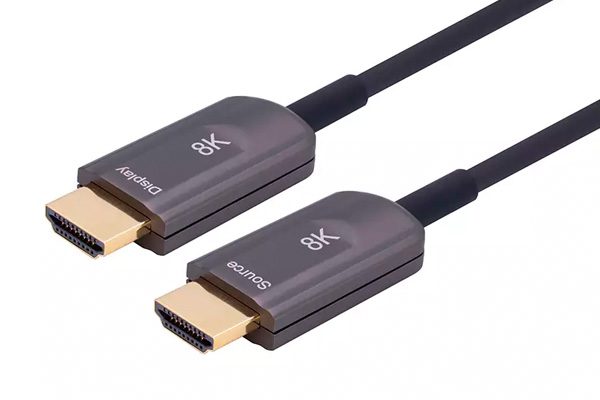
This is one of the most expensive surprises in a home-theater or boardroom install: everything looks right, the picture is perfect, and the sound system simply will not receive return audio. Here is why it happens and how to specify around it.
Why eARC Needs Copper Even in a Fiber Cable
HDMI’s architecture is asymmetric for active optical cables. The high-bandwidth forward channel — video, HDR, 4K@120, 8K — is converted to light and sent down the fiber. But two signals must travel in the opposite direction:
- eARC (Enhanced Audio Return Channel) — carries up to 37 Mbps of lossless audio (Dolby TrueHD, DTS-HD MA, Dolby Atmos) from the TV back to the AVR or soundbar.
- CEC and the EDID/handshake path — the control and capability negotiation that tells devices what is connected.
Neither of these runs over the optical fiber. They ride on a dedicated copper conductor pair — typically in the 21–30 AWG range — that is bundled alongside the fiber inside the same jacket. If that pair is present and correctly wired, eARC works. If the manufacturer omitted it to save a few cents, eARC does not work, no matter how impressive the video bandwidth claimed on the packaging.
The Specification Trap: 48 Gbps Does Not Guarantee eARC
Buyers reasonably assume that a “48 Gbps Ultra High Speed” fiber cable supports every HDMI 2.1 feature, eARC included. The two are not the same claim:
| What the spec says | What it actually guarantees | What it says about eARC |
|---|---|---|
| 48 Gbps / Ultra High Speed | Forward video bandwidth and protocol compliance | Nothing — eARC is a separate return channel |
| “Supports eARC” / “ARC+eARC” | A copper return pair is present and wired | Yes — but verify in writing |
| ARC only | Compressed return audio, lower bandwidth | No lossless Atmos / TrueHD |
| No ARC claim at all | Likely no return pair | No return audio |
The honest way to read a data sheet: video bandwidth and audio return are two separate lines. If the second line is missing, treat eARC as unsupported even when the first says 48 Gbps. Our note on what Ultra High Speed certification actually proves covers the same distinction from the certification angle.
5 Checks Before You Buy a Fiber HDMI Cable for eARC
1. Confirm eARC is explicitly listed — not just “ARC”
ARC and eARC are different. ARC carries compressed stereo or Dolby Digital at a few Mbps; eARC carries the full lossless object-audio bitstream at up to 37 Mbps. A product page that says only “ARC” will not give you Atmos from a TV app. Ask for eARC by name.
2. Ask whether the cable has a discrete copper return conductor
This is the question that separates real eARC AOCs from video-only ones. A manufacturer who designed the return path will answer immediately and can point to it in the construction drawing. A reseller who only repeats “48 Gbps” cannot.
3. Get it in the quotation or spec sheet
For a project install, “supports eARC” should be a line item, not a verbal promise. If it is not written down, you have no leverage when the soundbar reports no signal after the cable is in the wall.
4. Check direction marking before blaming eARC
An AOC must be connected Source-to-display. A reversed cable gives no picture at all, which can look like a handshake failure. Rule this out first — the reasoning is in why fiber HDMI cables are directional.
5. Test the exact chain before closing the wall
eARC is a negotiation between your specific TV, cable and soundbar. An AV receiver or an HDMI switch in the path can break it even with a perfect cable. Verify the actual devices at the actual target length before the run becomes permanent — a general rule we also apply in the HDMI AOC troubleshooting guide.
When eARC Is Not Worth Specifying
If the audio source is a separate player connected directly to the AVR, you do not need eARC at all — the player feeds the receiver and the TV gets video only. eARC matters specifically when the TV is the source of the audio: built-in streaming apps, a tuner, or a console connected to the TV with sound returning to a soundbar. Know which setup you have before paying for the return path.
Specify the Return Path, Not Just the Bandwidth
Video bandwidth gets all the marketing attention, but the copper return pair is what decides whether your sound system works. For a fiber HDMI run that must carry eARC, confirm the return path in writing and verify the full chain at your length. Our fiber HDMI AOC line offers versions with the eARC return conductor — tell us your TV, soundbar and run length and we will confirm the right part number before you order.
Related posts:
 Market Research Report on Fiber HDMI, DisplayPort and USB Cables in Germany (2026 Edition)
 How to Choose EMI-Resistant Fiber Cables for MRI & CT Medical Imaging Systems
 Medical Cable Sterilization Standards: Autoclavable & Disinfectable AOC for Clinical Use
 HDMI AOC Not Working: 7 Reasons You Get No Signal