Short answer: when a fiber optic HDMI cable splitter setup drops signal, the fiber is rarely the culprit. An AOC that holds 48 Gbps direct can go black, sparkle, or fall to 1080p once a splitter is inserted — that box now controls EDID, HDCP, the +5 V rail and the bandwidth ceiling. Use a splitter rated for the full format, confirm the port feeding the AOC supplies +5 V, keep the Source end facing the signal, lock EDID to a display the chain can carry, and add one link at a time. Five failure points cause nearly every case.
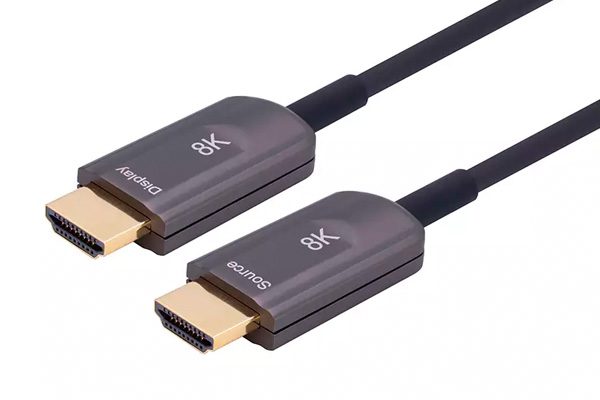
“Fiber optic HDMI cable splitter” is usually searched after a bench test passed: the long cable worked, then a splitter was added for a second screen and the picture never came back. This guide covers that junction, not the general checklist in HDMI AOC not working: 7 reasons. Here is what changes electrically, what fails, and a test order that finds the culprit without swapping half the system.
What a splitter changes
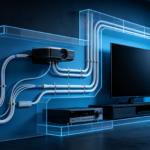
A direct AOC run is one link: one transmitter, one receiver, one handshake. A splitter creates at least three — source to splitter, splitter to display A, splitter to display B — and it re-generates the signal as an active participant:
- EDID: the source sees the splitter’s capability table, not the monitor’s.
- HDCP: protected 4K or 8K content dies if the copy-protection exchange fails here.
- Power: lightly built switchers are a known weak +5 V rail on their outputs.
- Bandwidth: a splitter sold as “4K” may be limited to 18 Gbps — below 4K120 or 8K30.
“The cable worked yesterday” proves little: it worked in a different chain. AOC adds direction and source-end power to this list.
The five failure points
| Failure point | Symptom | Why it happens | First check |
|---|---|---|---|
| Bandwidth below the format | Black at 4K120/8K, fine at 1080p | 18 Gbps switches cannot pass 48 Gbps HDMI 2.1; DSC is a separate claim | Look for 48 Gbps / HDMI 2.1 on the splitter datasheet |
| EDID conflict | One screen works, both fail; HDR vanishes | Splitter must advertise one format from two different displays | Set COPY / TV to the capable display; test outputs alone |
| No +5 V at the output | Long cable dead, short copper fine | AOC conversion electronics draw power at the Source end | Measure +5 V; use a USB-assisted AOC if absent |
| AOC reversed | No picture, no error | Transmitter and receiver ends are fixed | Check Source / Display labels at both ends |
| HDCP or eARC | Protected app black; soundbar loses audio return | HDCP 2.3 and eARC’s return path are not guaranteed by bandwidth | Confirm HDCP revision; see do fiber HDMI cables support eARC |
Only one row concerns the cable, and even that is about power or orientation, not glass quality. The same fiber optic HDMI cable can be perfect on one port and useless on the next.
Power and direction: the two AOC rules
An AOC has electronics in both connectors, normally powered from HDMI +5 V at the Source end through hybrid copper conductors. No external adapter is needed in normal use — but the assumption breaks at a splitter output. Some switchers pass +5 V through, some do not, and a TV’s USB port is a poor substitute: it may switch off in standby or deliver less current than specified. The connector marked Source must face the signal producer; Display faces the screen. Two layouts work:
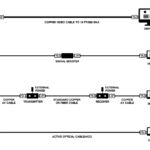
- Source → AOC → splitter → short jumpers. The AOC draws power from the source device, usually the most robust +5 V in the chain, and carries the full format to the splitter. Use this when the splitter sits at the display end.
- Source → splitter → AOC → display. The splitter output becomes the “source” for that link, so plug the AOC’s Source end into the splitter. This only works if that port supplies +5 V; ask for a USB-assisted AOC if not. Use this for a rack feeding several distant screens.
In layout 2, a reversed AOC is the most common “dead output” report. Our why fiber HDMI cables are directional guide covers the labels and the habit that prevents it: mark both ends before the cable enters conduit. Keep bends inside the datasheet radius too — a tight pull can add loss that only surfaces when the splitter re-negotiates at full bandwidth; see how tight you can bend a fiber HDMI cable.
EDID: why the second display changes everything
The source chooses one output format from the EDID it receives. With a splitter, that table is chosen by the box: it may follow output 1, follow the weakest screen, or advertise a mode neither display can hold. If the picture returns when the second screen is unplugged, EDID policy is the problem, not the AOC.
Look for COPY / TV / reference-output settings and point them at the display that supports your format. Start at 1080p60 for a stable link, then raise resolution and refresh one step at a time until the chain drops. Across a wall of screens the same logic applies — see specifying AOC for video walls.
Match the splitter to the format
HDMI connectors look alike; the claim behind them matters. Our fiber HDMI range covers 18 Gbps (4K60 4:4:4) and 48 Gbps (8K30 4:4:4, or 8K120 with DSC), from 1 to 100 m. Every device in the chain must clear the same bar:
| Format | Link | Splitter must state |
|---|---|---|
| 1080p60 | ~3 Gbps | High Speed HDMI; almost any splitter |
| 4K60 4:4:4 HDR | 18 Gbps class | Premium High Speed, HDCP 2.2/2.3 |
| 4K120 / 8K30 4:4:4 | 48 Gbps class | Ultra High Speed, HDMI 2.1, DSC pass-through where used |
| 8K120 | 48 Gbps with DSC | Explicit DSC support on every port; verify with real hardware |
| eARC audio return | Separate return channel | eARC-capable splitter; most long fiber cables need a copper return pair |
A 48 Gbps AOC cannot upgrade an 18 Gbps splitter, and one cheap coupler can undo the chain. For permanent installs, ask the splitter vendor for tested formats per port and ask us for the AOC’s test report at the exact length — the same evidence behind what Ultra High Speed HDMI certification proves.
A five-minute test order
- Bypass everything: source directly to one display with the AOC. If that fails, check power and direction.
- Bypass the AOC: short known-good HDMI cable through the splitter. If that fails, suspect the splitter or EDID.
- Test outputs one at a time: one dead port points to the splitter’s power rail; both failing points to format or EDID.
- Lower the format: set 1080p60 SDR, then raise resolution and refresh until the link drops.
- Power-cycle in order: displays, splitter, source. This forces a fresh EDID and HDCP handshake.
AOC conversion adds nanoseconds; a slow splitter handshake is what you are waiting on when the screen takes seconds to appear. Do fiber optic HDMI cables add lag? puts that number next to a video frame.
FAQ
Can I put a fiber HDMI cable on a splitter output?
Yes, if that output supplies +5 V and the Source end faces the splitter. Otherwise use a USB-assisted AOC or move the splitter to the display end.
Does a 48 Gbps splitter guarantee 4K120 or 8K?
No. Source, display, HDCP and EDID must all support the mode; DSC-based formats need explicit DSC pass-through.
Why does the second display kill the picture?
The splitter must advertise one EDID from two displays. Copy the capable screen or use a splitter with real EDID management.
Can a splitter damage an AOC?
Not electrically in normal use. Reversing the cable or exceeding its bend radius is what ruins a run — an AOC cannot be re-terminated on site.
Next step
Tell us your source model, splitter make and model, displays, target format and the length of each run. We will recommend the layout that keeps the AOC powered in the right direction, confirm test data at that length, and quote cable plus samples. Custom lengths start at one sample. Request a quote or a sample.