
Short answer: no. A fiber optic HDMI cable adds latency in the nanosecond range — the electro-optic conversion inside the connector takes under 0.000002 milliseconds. That is roughly 3 million times faster than a single frame at 144 Hz (6.9 ms) and 50 million times faster than human reaction time (~100 ms). If an HDMI AOC “feels laggy,” the cause is almost never the fiber. It is bandwidth negotiation, a display process, or a device in the chain — all of which affect a copper cable exactly the same way.
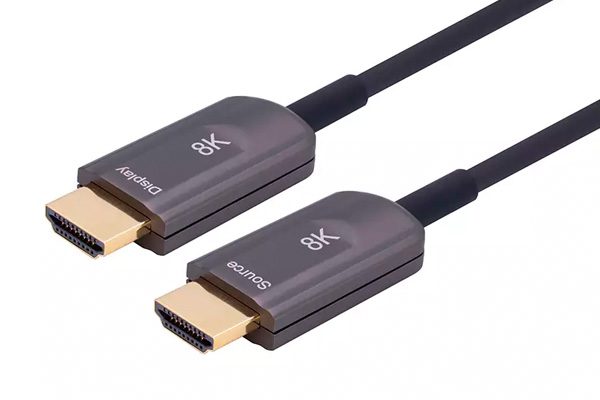
This is the single most common objection we hear from esports players and AV integrators before specifying an AOC. It deserves a precise answer rather than “it’s fine,” so here is the arithmetic, the real sources of lag, and a test that settles it in ten minutes.
How Much Latency Does the Optical Conversion Actually Add?
An active optical cable (AOC) does one thing a copper patch cord does not: it turns an electrical HDMI signal into light at the source end and back into electricity at the display end. That conversion is done by a small transceiver chip. The propagation delay of light through the fiber itself is about 5 nanoseconds per meter — over a 30 m run, roughly 150 nanoseconds, or 0.00015 ms.
Put that next to the time scales a player actually perceives:
| Event | Time | Compared to a 30 m fiber AOC |
|---|---|---|
| Light traveling 30 m of fiber | ~0.00015 ms | baseline |
| Electro-optic conversion (both ends) | <0.000002 ms | negligible |
| One frame at 240 Hz | 4.17 ms | ~28,000× longer |
| One frame at 144 Hz | 6.94 ms | ~46,000× longer |
| One frame at 60 Hz | 16.7 ms | ~110,000× longer |
| Typical human visual reaction | ~100 ms | ~660,000× longer |
The fiber is not the bottleneck. It is several orders of magnitude below anything a player or a display can resolve.
What Actually Causes “Lag” on a Long HDMI Run
When someone reports input lag after switching to a fiber HDMI cable, one of these is almost always the real culprit. Every one of them is a property of the source, the display, or the signal format — not of the cable medium.
1. The link dropped to a lower refresh rate
This is the most common. A source and display negotiate the highest format both can hold over the link. If an intermediate device — an AV receiver, a switcher, a wall plate — cannot pass 48 Gbps, the link quietly settles for 4K@60 or drops VRR. The picture still looks fine, but motion feels different. Check the display’s on-screen info: if it says 60 Hz instead of 120 Hz, that is your “lag.”
2. Display post-processing switched on
Game Mode off means the TV is running motion interpolation, dejudder and noise reduction on top of the signal. That can add tens of milliseconds — thousands of times the fiber’s contribution. It is the classic case of blaming the new cable for a setting that was already there.
3. Frame doubling on a mismatched refresh rate
Feeding 60 fps into a 144 Hz display without VRR introduces uneven frame pacing. It looks like stutter, not latency, but players describe both as “lag.” VRR (G-SYNC / FreeSync) removes it, and VRR needs the full HDMI 2.1 feature set end-to-end.
4. DSC compression negotiation
At 8K, and at some 4K@120 4:4:4 configurations, the link uses Display Stream Compression. DSC is visually lossless and adds well under a millisecond, but it is a negotiation: if one device in the chain does not support it, the format falls back. Again — a format problem, not a fiber problem. We cover the format side in how far an 8K HDMI cable can actually run.
5. A reversed AOC (no image, not lag)
An AOC is directional: the Source end must face the player or PC, the Display end the screen. Reversed, you get a black screen rather than slow input — the mechanics are in why fiber optic HDMI cables are directional. Worth checking first because it is free to fix.
Fiber AOC vs Copper: Latency at a Glance
| Factor | Copper HDMI (passive) | Fiber HDMI AOC |
|---|---|---|
| Propagation delay | ~5 ns/m | ~5 ns/m (same physics) |
| Signal conversion | None | <0.000002 ms |
| Usable length at full 48 Gbps | ~2–3 m | 10–100 m |
| Latency at 15 m and 4K@120 | Passive copper can’t hold the format | Full format, <0.0002 ms added |
| EMI-induced retries | Possible near power gear | Immune — fiber carries no electrical signal |
For runs under about 3 m, a passive copper cable is simpler and just as fast. Past that, copper stops holding the full 48 Gbps format and starts causing the very format fallbacks people mistake for lag — while a fiber AOC keeps the link at its negotiated rate.
How to Prove It on Your Own Setup
You do not need a label or a spec sheet to settle this. A repeatable ten-minute test:
- Record the baseline. Note the display’s reported resolution and refresh rate with your current cable, and run a frame-timing overlay (present in most engines, or a phone slow-motion clip of a stopwatch on screen).
- Swap only the cable. Connect the AOC Source end to the console/PC, Display end to the screen, no other changes. Confirm the display still reports the same refresh rate.
- Check Game Mode. Make sure the TV has not re-enabled post-processing after the input change.
- Repeat the overlay. If the numbers move by more than a frame, the cause is a format or settings change — find it in the display menu, not in the fiber.
If you are specifying cables for a gaming room, a sim rig or a tournament setup, the practical takeaway is simple: buy for the format at the length, not for a latency fear that does not exist. Our 48 Gbps fiber HDMI AOC line is length-tested so the link holds 4K@120 and VRR at the distance you actually need — and tell us your source, display and run length and we will confirm the format before you order.
Related posts:
 HDMI 2.1 vs DP 2.1 Comparison Guide: Full Technical Analysis of Display Interfaces
 Market Research Report on Fiber HDMI, DisplayPort and USB Cables in Germany (2026 Edition)
 How to Choose EMI-Resistant Fiber Cables for MRI & CT Medical Imaging Systems
 DisplayPort 1.4 Cable Distance: Copper vs Fiber at 32.4 Gbps