
Short answer: at full 48 Gbps, a passive copper 8K HDMI cable is reliable to roughly 3 metres. Beyond that, signal integrity collapses and you get dropouts, sparkles, or no picture at all. A fiber optic active optical cable (AOC) carries the same 48 Gbps link 20 to 100 metres without regeneration — 8K30 at 4:4:4 uncompressed, or 8K120 with DSC. No passive 8K HDMI cable comes close to that.
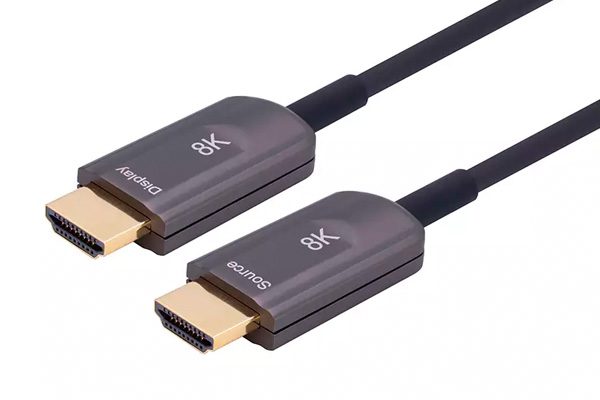
That gap is not marketing. It comes from how the two cable types move data, and it decides what you can specify on a real project. This page breaks down the actual distance limits, where copper stops working, and what an AOC will and will not do for you.
Why 8K changed the distance math
An HDMI 2.1 link at 8K60 uses four high-speed lanes running at 12 Gbps each, 48 Gbps total — the bandwidth defined by the HDMI 2.1 specification. HDMI 2.0 carried 18 Gbps over the same four lanes. Tripling the data rate does not just require better connectors — it changes the physics of the copper inside the cable.
At 12 Gbps per lane, the signal attenuates fast. High frequencies travel near the conductor surface, so the effective copper cross-section shrinks as frequency climbs. On top of that, the cable behaves like a low-pass filter: the longer the run, the more the high-frequency content is smeared, until the receiver can no longer tell a 1 from a 0. That is why a cable that handles 4K60 at 10 metres may fail completely at 8K60 over 3 metres.
Passive equalization inside the source and sink helps, but it only buys a metre or two. It cannot rescue a badly attenuated 48 Gbps signal over 15 metres of copper.
Where an 8K HDMI cable stops working
Certified Ultra High Speed HDMI cables are tested to 48 Gbps, and most of them are certified at lengths of 1 to 3 metres. Longer passive cables exist, and some work — but “works on the bench in a 20 °C lab” and “works inside a wall for eight years” are different claims. Temperature, cable routing, connector quality, and the specific source device all move the failure point. What that certification label does and does not guarantee is covered in detail in what Ultra High Speed HDMI certification actually proves.
In practice, for 8K60 or 4K120 at 4:4:4, plan on:
- 1–3 m: passive copper is fine and the cheapest option.
- 3–5 m: marginal. Test the exact source and display pair before committing.
- Over 5 m: do not specify passive copper at 48 Gbps. Use an AOC.
What an active optical cable does differently
An 8K HDMI cable built as an AOC is not a “boosted” copper cable. Inside the source-side connector there is a small transmitter that converts the electrical HDMI signal into light. That light travels down four strands of fiber with almost no attenuation and complete immunity to electromagnetic interference. At the display end, a receiver converts it back to electrical HDMI.
Because the signal spends nearly all of its journey as light, distance stops being a signal-integrity problem. The copper inside an AOC only exists for a few centimetres at each connector, and it also carries the +5 V line that powers the conversion chips. If you want the general mechanism rather than the 8K-specific numbers, our explainer on what an active optical cable is covers the construction and the trade-offs.
Three practical consequences follow:
- No EMI pickup. Routing next to mains cable, motors, or LED drivers does not degrade the link. This is the same reason AOC is used in medical imaging rooms and on stage.
- Thin and light. A 20 m AOC is roughly the diameter of a charging cable, which matters when you are pulling through 25 mm conduit with four bends.
- Directional by design. The connectors are not interchangeable. One end is marked Source, the other Display.
8K HDMI cable distance by type
Every figure below assumes a certified 8K HDMI cable tested at the stated length.
| Link | Bandwidth | Passive copper (typical) | Fiber AOC (typical) |
|---|---|---|---|
| 1080p60 | 4.5 Gbps | 10–15 m | 30–100 m |
| 4K60 4:4:4 | 18 Gbps | 5–8 m | 30–100 m |
| 8K60 / 4K120 | 48 Gbps | 2–3 m | 20–50 m |
Two caveats worth stating plainly. First, these are typical figures, not guarantees — the only number that counts is the one on the test report for your specific part number. Second, bandwidth and length trade off inside a single AOC: a 100 m unit may be specified at 4K60 rather than 8K60, because the transmitter has to push harder over the longer fiber. Ask for the length-versus-bandwidth table, not just the headline “supports 8K”.
What an AOC will not do
An 8K HDMI cable has a few hard limits worth stating upfront:
- You cannot cut it or re-terminate it on site. Length must be decided at order time. Measure twice.
- It needs power from the source side. The +5 V rail on the HDMI port normally provides it. Very long runs or weak source ports may need a powered variant — check before you bury the cable.
- It has a minimum bend radius. Around 20 mm for typical 4.0 mm jackets. A crushed fiber is a dead cable.
- Feature support varies. Confirm eARC, CEC, and HDCP revision support if your installation depends on them; not every AOC passes every side-channel feature.
If the cable is already in the wall and showing no picture, the cause is usually direction, +5 V or HDCP rather than a dead fiber — the seven-cause troubleshooting order walks through those in the order that costs least to test.
A specification checklist for integrators
- Fix the bandwidth requirement first. An 8K HDMI cable and a 4K60 cable are different products. Do not size the cable for the display you have today if the roadmap says 8K.
- Measure the actual route, not the straight line. Add for bends, service loops, and the path through conduit.
- Confirm power at the source end. Especially with matrix switches and extenders, which sometimes under-deliver on the +5 V rail.
- Order one sample and burn it in. Run the exact source and sink pair for 48 hours at the target resolution before you commit to 200 pieces.
- Ask for the test report. Eye diagram and BER at the specified length tell you more than a spec sheet claim.
FAQ
Can I use a 15 m passive HDMI cable for 8K?
Almost certainly not. At 48 Gbps, a 15 m passive 8K HDMI cable will not pass certification, and even if it lights up on the bench, it will likely fail intermittently once installed. Use an AOC.
Does an AOC need external power?
No, in most cases. The cable draws power from the source device’s +5 V line. Runs beyond roughly 30 m, or sources with weak HDMI power output, may need a powered version.
Is fiber HDMI better for image quality?
No. HDMI is digital — if the bits arrive intact, the picture is identical. AOC is better at delivering the bits over distance, not at making the image look different. Where it does help visibly is eliminating the sparkles and dropouts caused by marginal copper links.
Can I run an AOC through the same conduit as mains cable?
Yes. The fiber is immune to electromagnetic interference, so separation rules are driven by electrical code, not signal integrity. That is one of the main reasons AOC gets specified for retrofit work.
Next step
If you are specifying an 8K or 4K installation and the run is longer than 3 metres, a passive 8K HDMI cable is the wrong default. Our fiber optic HDMI AOC range covers HDMI 2.1 at 48 Gbps, custom lengths from 1 to 100 m, and OEM branding for distributors.
Tell us the resolution, the run length, and the conduit diameter — we will come back with the right part number and a test report. Request a quote.
Related posts:
 HDMI AOC Not Working: 7 Reasons You Get No Signal
 Understanding the Superiority of Pure Optical Fiber HDMI 2.1 Cables with MPO Connectors for 8K Transmission Over 500 Meters
 In fiber HDMI cabling projects(Wiring ducting), if the cable is accidentally routed backwards,how to solve?
 Analysis of the application of HDMI cables in data centers