
Short answer: a passive DisplayPort 1.4 cable holds HBR3 — 32.4 Gbps — to about 2 metres. At 3 m it is marginal and the link starts retraining. Over fiber, the same signal runs 100 metres with no regeneration and no measurable degradation. The 32.4 Gbps figure is the number that decides everything else on this page.
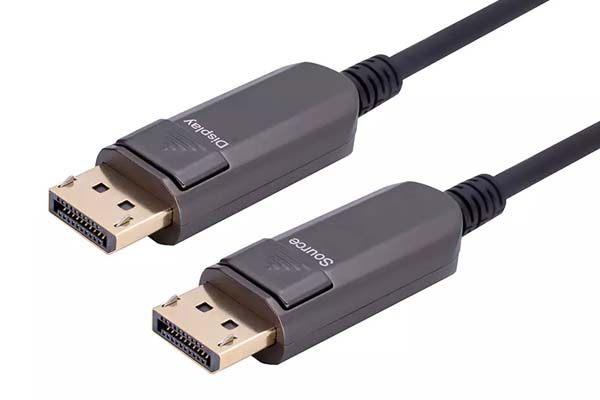
DisplayPort 1.4 is still the most common interface on professional monitors, video walls and control-room displays, and its distance limits are stricter than most installers expect. This page covers what the interface actually carries, where a passive cable stops working, and what changes when you move to fiber.
What a DisplayPort 1.4 cable actually carries
DP 1.4 runs four lanes at 8.1 Gbps each — HBR3 — for 32.4 Gbps of raw line rate. The encoding is 8b/10b, so payload bandwidth is 25.92 Gbps. That is the hard ceiling, and every resolution question below is just arithmetic against it. The figures come from the VESA DisplayPort standard, not from vendor marketing.
Two features in the 1.4 specification matter for cable selection:
- DSC (Display Stream Compression). A visually lossless codec that squeezes the stream by roughly 3:1. Without DSC, DP 1.4 cannot carry 8K60 at 4:4:4 — the format needs about 47.8 Gbps, well above the 25.92 Gbps payload. With DSC it fits comfortably. Both the source and the display have to support it.
- MST (Multi-Stream Transport). Several displays daisy-chained from one port. Each stream consumes bandwidth, so two 4K60 screens on one HBR3 link leaves very little headroom.
This is where a lot of “8K DisplayPort” marketing gets loose. A DisplayPort 1.4 cable can absolutely carry 8K60 — over DSC, or at 4:2:0 chroma, or at 30 Hz without compression. What it cannot do is carry uncompressed 8K60 at 4:4:4, because no DP 1.4 link has the bandwidth. Confirm DSC support at both ends before you promise a client 8K60.
Where a passive DisplayPort 1.4 cable stops working
At 8.1 Gbps per lane, a passive copper cable has a very short usable window. VESA’s DP8K certification tests cables at HBR3, and certified passive assemblies are generally 2 metres. Longer passive cables exist and often light up a 4K60 display — but 4K60 at 4:4:4 only needs about 12.5 Gbps, a third of the link’s capability. Passing 4K60 tells you nothing about whether the cable can hold HBR3.
The failure mode is worth knowing because it is not a clean break:
- Link training retries. The link drops to HBR2 (21.6 Gbps) or RBR silently. You get a picture, but 8K or high refresh is gone.
- Intermittent black frames. One or two frames lost per minute — invisible in a slide deck, unacceptable on a control-room wall.
- No link at all. Usually a cable that is simply too long for HBR3, or a connector with a damaged latch that is not fully seated.
Why fiber changes the arithmetic
A DisplayPort 1.4 cable built as an AOC puts a transmitter in the source connector and a receiver in the display connector, with four fiber strands between them. The electrical signal travels a few centimetres of copper at each end; the rest of the journey is light.
Optical fiber has two properties that matter here. Attenuation is low and flat — roughly 0.3 dB per kilometre at 850 nm in multimode — so 100 m costs a fraction of a decibel. And the fiber is dielectric, so it picks up no electromagnetic interference regardless of what it is routed beside. The mechanism is the same across interfaces; what an active optical cable is covers it generally, including the cases where an AOC is the wrong answer.
The practical consequences for a DisplayPort 1.4 cable:
- Distance is no longer the constraint. 100 m behaves like 2 m. There is no length-versus-bandwidth trade-off within the rated length.
- Routing beside mains cable is fine. In retrofit work this is often what makes the project possible at all — existing conduit, no separation available.
- It is thin. A 30 m AOC pulls through conduit that a passive copper assembly of the same length would never clear.
- It is directional. Source and display connectors are not interchangeable. This is the single most common installation error.
DisplayPort 1.4 cable distance by type
Typical figures for a compliant assembly at each link rate. Planning numbers, not guarantees.
| Link rate | Raw bandwidth | Passive copper | Fiber AOC | Typical use |
|---|---|---|---|---|
| RBR / HBR | 6.5–10.8 Gbps | 5 m | 100 m | 1080p, 1440p |
| HBR2 (DP 1.2) | 21.6 Gbps | 3–5 m | 100 m | 4K60 4:4:4 |
| HBR3 (DP 1.4) | 32.4 Gbps | 2 m | 100 m | 4K120, 8K30 4:4:4, 8K60 with DSC |
Note that HBR3 passive copper is a 2 m product. If a project needs 4 m at HBR3, there is no passive cable that will do it reliably, and no amount of “certified” branding changes that. The choice is active copper at best, fiber in practice.
Six things that break a DisplayPort link which are not the cable
Before replacing a DisplayPort 1.4 cable, rule these out. All six produce “no signal” or “wrong resolution” symptoms:
- The latch is not engaged. DP connectors latch. A plug that is inserted but not clicked sits a fraction of a millimetre out and loses the auxiliary channel, which kills EDID and HDCP while the main lanes may still train.
- DP++ vs native DP. Passive DP-to-HDMI adapters only work on DP++ ports. On a native DP port they produce nothing.
- MST hub bandwidth. Two displays on one HBR3 port share 25.92 Gbps. Two 4K60 screens at 4:4:4 will not both fit.
- HDCP 2.2 version mismatch. A source demanding 2.2 into a display limited to 1.4 gives a black screen on protected content only.
- Monitor input set manually. Auto-detect on some professional displays does not fire on a fiber link that powers up slower than copper.
- GPU port capability. A card with four DP outputs may not drive all four at HBR3 simultaneously — check the GPU’s total link budget, not just the port count.
Specifying a long DisplayPort run
- Start from the pixel format. Resolution, refresh and chroma decide the bandwidth. Everything else follows.
- Confirm DSC support at both ends if you are planning 8K60 or 4K120 at 4:4:4 on DP 1.4.
- Measure the routed path, including bends and service loops. AOC cannot be cut or re-terminated on site.
- Respect the bend radius — around 20 mm on a typical 4.0 mm jacket. A crushed fiber passes continuity and fails at temperature.
- Order one sample and burn it in at the target resolution for 48 hours before committing to a batch.
FAQ
Can a DisplayPort 1.4 cable do 8K at 60 Hz?
Yes, with DSC enabled at both ends, or at 4:2:0 chroma. Uncompressed 8K60 at 4:4:4 needs about 47.8 Gbps, which exceeds the 25.92 Gbps payload of HBR3. Without DSC, plan 8K30 at 4:4:4 — which is inside the link budget.
Is a longer DisplayPort 1.4 cable slower?
Not over fiber — the link rate is identical at 2 m and 100 m. Over passive copper, yes in a practical sense: a long cable fails link training and the link drops to a lower rate, which limits resolution and refresh rather than “slowing down” the cable.
Can I use a DisplayPort 1.4 AOC for a video wall?
Yes, and it is the usual choice. Fiber is immune to the EMI from the power distribution behind a wall, and the thin jacket routes through the frame. Remember the direction markings and that each run needs its own cable — daisy-chaining works only if the displays support MST.
Does a DisplayPort 1.4 cable work with a Mini DisplayPort device?
Mini-DP and full-size DP are electrically identical, so a Mini-DP AOC works on either end. What you cannot do is adapt the direction — the source connector still has to go to the source.
Next step
If the run is longer than 2 metres and you need HBR3, passive copper will not hold it. Our fiber DisplayPort 1.4 AOC range covers 32.4 Gbps from 1 to 100 m, in standard, armored and Mini-DP versions, with HDR10, HDCP 2.2 and OEM branding.
Send us the resolution, refresh rate, chroma format and route length — we will confirm which part holds it and supply the test report for that length. Request a quote.


