
While HDMI is busy rolling out patches to fix its compromised HDMI 2.1 specifications, DisplayPort 2.1 has arrived packing a maximum 80Gbps bandwidth. It can take ages to get a valid video cable working properly, and finding a suitable cord is harder than landing a date. Forum threads about screen flickering surged to over ten thousand posts last year, doubling the count from the previous year and hitting a decade-long peak. Ironically, HDMI’s official theoretical ceiling has climbed to 96Gbps, yet authentic certified products remain extremely hard to verify. Many consumers splurge on premium high-end monitors, leaving legacy ports like VGA and DVI fully obsolete; still, graphics card connectors have long been a consistent source of frustration for users.
Current Market Reality for High-Refresh 4K Monitors
Affordable 4K high-refresh monitors now retail for under 2,000 RMB, with DisplayPort 1.4 becoming a mainstream default specification. Yet compatibility failures and visual glitches plague nearly every monitor brand on the market. On one occasion, I tried to launch a game only to be met with full-screen snow noise, forcing me to dial down display refresh rates. After downgrading the DP protocol to DP 1.2, the image turned blurry and pixelated, prompting me to unplug the cable entirely out of frustration.
Most modern monitors ship with dual input ports: one HDMI and one DisplayPort. HDMI comes in multiple revisions, and roughly 60% of products labeled HDMI 2.1 on the market are cut-down compromised variants. When I connected a so-called full-spec HDMI 2.1 cord to a television, the signal automatically capped out at just 24Gbps bandwidth. Many consumers feel misled and overcharged by such misleading port labeling practices.
As users pursue 4K ultra-high resolution, high refresh rates (144Hz+), HDR and next-gen display features, choosing between DP and HDMI hinges not only on raw bandwidth figures but overall ecosystem compatibility and real-world usability.
Core Head-to-Head: Technical Specifications & Theoretical Performance
DP 1.4 vs Compromised/Full-Spec HDMI 2.1 Spec Breakdown
| Spec | DisplayPort 1.4 | HDMI 2.1 |
|---|---|---|
| Max Bandwidth | 32.4Gbps (HBR3 standard) | 48Gbps full FRL mode; 9–40Gbps compromised TMDS variants |
| Encoding Scheme | 8b/10b coding | 16b/18b coding |
| Peak Supported Spec | 4K@240Hz (requires DSC compression) | Full-spec:8K@60Hz; compromised: limited lower refresh/resolution |
| Connector Feature | Lock-in latch design to prevent accidental disconnection | No locking clip |
| Primary Use Case | PC & competitive esports | Game consoles + home audio-visual equipment |
HDMI 2.1 is split into two distinct transmission modes set by the HDMI Forum: legacy TMDS (rebranded old HDMI 2.0 standard) and full-spec FRL mode. Only FRL-mode HDMI 2.1 delivers the full 48Gbps bandwidth alongside all official HDMI 2.1 features; TMDS-based HDMI 2.1 is functionally equivalent to HDMI 2.0 with bandwidth ranging from under 20Gbps up to 40Gbps while missing multiple core 2.1 functions.
FRL mode uses four configurable transmission lanes with a minimum three-lane setup starting at 9Gbps total bandwidth. Four-lane configurations offer four tiered bandwidth options: 24Gbps, 32Gbps, 40Gbps and full 48Gbps. Manufacturers can legally label any of these four variants as HDMI 2.1 under official HDMI rules, making only the 48Gbps tier true full-spec HDMI 2.1. Marketing lower-bandwidth iterations as full-spec HDMI 2.1 is misleading commercial practice.
Next-Gen DP 2.1 Future Spec Preview
DP 2.1 adopts the new UHBR standard with three configurable transmission tiers:
- UHBR10 (40Gbps total, 10Gbps per lane): Ideal for regular 4K daily use
- UHBR13.5 (54Gbps total,13.5Gbps per lane): Mid-range high-end consumer setup
- UHBR20 (80Gbps total,20Gbps per lane): Enthusiast flagship-grade specification
DP2.1’s maximum raw bandwidth hits 80Gbps with an effective usable data rate of 77.37Gbps, over 2.4x higher than DP1.4’s 32.4Gbps ceiling. By contrast, HDMI 2.1a and updated revisions retain a fixed 48Gbps hard bandwidth cap despite incremental feature upgrades like SBTM. From pure technical metrics, DP2.1 holds a clear advantage: it runs native uncompressed 4K@240Hz, whereas equivalent HDMI2.1 setups need DSC compression just to hit 4K@120Hz – a critical difference for competitive gamers. DP2.1 natively supports uncompressed 16K@60Hz, while HDMI2.1 relies entirely on DSC compression to achieve 8K@120Hz, granting superior long-term future compatibility for DP.
Ecosystem Compatibility, Hardware Adoption & Common Troubleshooting Issues
Graphics Card & Monitor Hardware Adoption Status
- GPU side: AMD’s Radeon RX7000 series is the first mainstream lineup with native DP2.1 support; NVIDIA RTX40 series caps out at DP1.4a; Intel Arc GPUs implement DP2.0 standard only. Users wanting full DP2.1’s 80Gbps bandwidth are currently limited to AMD graphics hardware.
- Monitor side: DP2.1-equipped displays remain in early market rollout stages. Products like the TCL 27C3A Pro 27-inch 4K 165Hz gaming monitor ship with DP1.4 (DSC-enabled), dual HDMI2.1 and Type-C ports as standard. Most mainstream high-refresh 4K monitors equip both DP1.4 and HDMI2.1 ports, leveraging DSC compression on DP1.4 to unlock high refresh rates.
- Game Consoles: PlayStation5 and Xbox Series X/S build their entire ecosystem around HDMI, yet neither runs full 48Gbps HDMI2.1 bandwidth: Xbox Series X maxes at 40Gbps while PS5 tops out at only 32Gbps, resulting in compromised “cut-down” HDMI2.1 performance even on flagship gaming hardware.
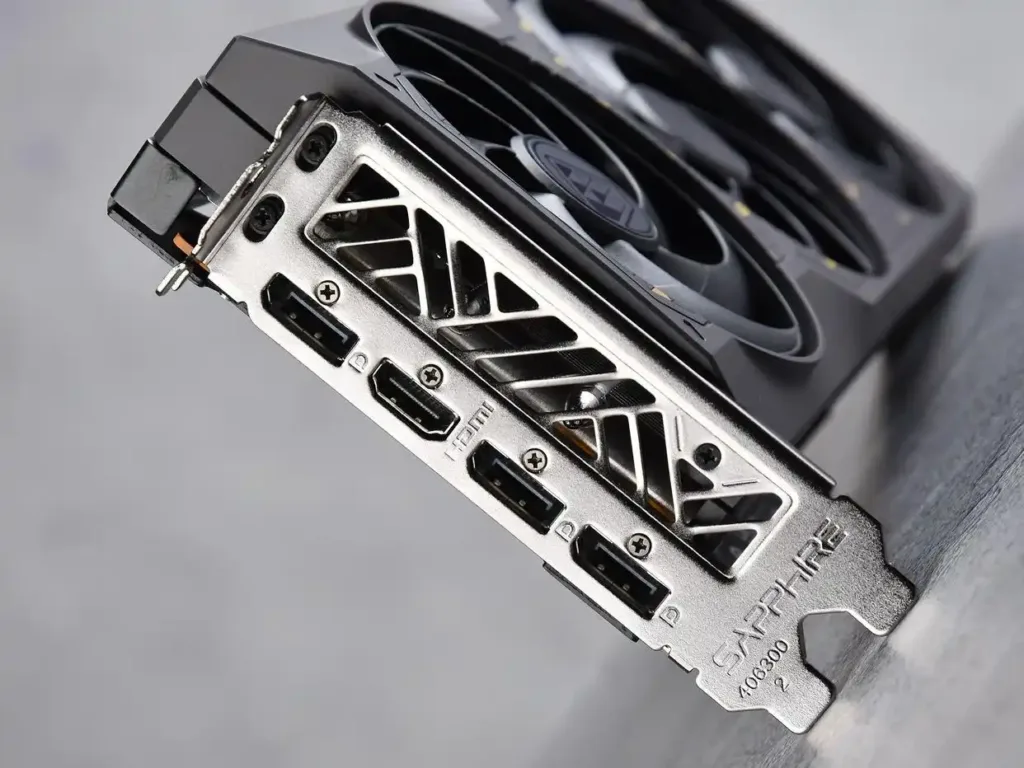
Root Causes for Black Screens, Flickering & Display Dropouts
Visual artifacts stem from four core factors: substandard under-spec cables with insufficient bandwidth and poor shielding, mislabeled HDMI2.0 ports falsely marketed as HDMI2.1, outdated GPU/monitor firmware/driver bugs, and inherent cross-protocol compatibility flaws between different display standards.
Step-by-Step DP No-Signal Troubleshooting
- Confirm DP cable is plugged into discrete GPU ports instead of motherboard integrated graphics jacks; DP’s locking latch requires firm insertion until an audible click confirms full seating. Test alternate DP ports on your GPU to rule out single-port hardware failure.
- Manually toggle input source to DP via the on-screen monitor menu, as many panels fail to auto-detect DP input reliably.
- Fully power-cycle your display: unplug monitor power cord for 30 seconds before reconnection and restart your PC to reset the monitor’s internal signal processing chip.
- Fix driver conflicts: boot into Windows Safe Mode, fully wipe old GPU drivers with DDU utility then install official latest manufacturer drivers. Use an HDMI cable to boot into BIOS, enable CSM (Compatibility Support Module), save settings and reboot before reconnecting DP cable.
- Fiber-optic DP cables are directional: mark-labelled Source end connects to PC/GPU while Display end plugs into monitor; reversed cabling yields zero video output.
DP vs HDMI Industry Certification & Market Malpractice
- DisplayPort (VESA): Open standard with zero manufacturer licensing fees, allowing any brand to implement DP ports freely without costly certification charges. Full uncompressed bandwidth is available out of the box for 4K and high refresh rates. However, unregulated aftermarket cables create rampant quality issues: many cheap wires use aluminum-clad copper conductors to cut production costs, passing loose certification checks while causing intermittent flickering and unstable connections for end users.
- HDMI: Strict paid certification framework plagued by fragmented real-world implementation. After the HDMI Forum discontinued official HDMI2.0 naming, legacy HDMI2.0 ports with eARC capability were rebranded as HDMI2.1 TMDS; non-eARC legacy ports technically should downgrade to HDMI1.4b labeling, yet countless TV manufacturers illegally stamp HDMI2.1 branding on non-compliant products for marketing gains.
Consumer Purchase Guidance: Cost Breakdown & Practical Buying Tips
Hidden & Explicit Cost Analysis
- Direct Hardware Premium: DP2.1-certified monitors and AMD GPUs carry noticeable retail markup; premium certified DP80 (UHBR20 80Gbps) cables command high pricing, with VESA-certified DP40 rated for runs exceeding two meters and DP80 capped at 1-meter default length. Luxshare has developed active 3-meter USB-C to USB-C DP80 cables fully certified for DP2.1 UHBR20, supporting 16K or dual 8K professional display setups at steep cost.
- Hidden Time Cost: Compatibility debugging and troubleshooting often cost users more money and effort than their monitor purchase price. A common real-world example: business users carrying Type-C docking stations for conference screen mirroring frequently encounter instant black screen failures when plug-and-play is expected.
Targeted Buyer Recommendations
- Future-proof enthusiast buyers: Weigh DP2.1 upgrade costs carefully. Limited current compatible hardware and sparse high-bandwidth content mean DP2.1’s full potential will remain untapped for years as the standard gradually gains mainstream adoption.
- Mainstream PC/Gaming Users: Stick to mature DP1.4 + standard HDMI2.1 setups with DSC compression for fully functional high-refresh 4K gameplay. Competitive esports players prioritize DP1.4: seamless G-Sync/FreeSync synchronization eliminates screen tearing, delivers ultra-low input lag critical for fast-paced titles like CS2, and supports MST daisy-chaining for multi-monitor workstation configurations.
- Console & Home Theater Audiophiles: Select HDMI2.1 exclusively. PS5/Xbox Series X require full-spec HDMI2.1 to unlock native 4K@120Hz + full HDR functionality; eARC enables lossless Dolby Atmos audio passthrough to surround sound speakers and soundbars for immersive home cinema.
Universal Anti-Scam Buying Checklist for HDMI2.1 Products
- Check bandwidth baseline: Any HDMI2.1 marked with asterisk or noted eARC-only almost always runs on legacy 18Gbps TMDS (old HDMI2.0 bandwidth).
- Verify DSC compression status: Multiple mid-range HDMI2.1 monitors powered by Realtek RTD2718QD display controller cap at just 24Gbps FRL bandwidth, relying entirely on DSC compression to hit advertised 4K 144Hz despite “full-spec HDMI2.1” marketing text.
Industry Outlook & Future Standard Competition Trend
Display interface development trends toward ever-higher bandwidth, tighter USB-C/Thunderbolt integration and dynamic content adaptive features like HDMI’s SBTM. DP2.1 natively supports USB-C form factors compliant with USB4 physical layer specs and mandates mandatory DSC compression + Panel Replay across all certified devices.
Industry competition continues between two camps: DP leverages its open licensing, superior technical specs to expand deeper into PC and professional display markets, while HDMI retains dominant market share across televisions, consumer AV gear and gaming consoles via its established mature ecosystem built over decades. VESA-certified DP80 cables remain essential to unlock full DP2.1 performance on enthusiast gaming and professional editing setups.
Even affordable mass-market monitors like Redmi’s 2K panels enjoy strong sales thanks to properly implemented full-spec DP ports with one-click refresh rate adjustment features. Premium OLED and ultrawide gaming monitors carry higher price tags, yet consumers only demand plug-and-play reliability without flickering, blackouts or underperforming bandwidth.
A recent PC build experience illustrates widespread cable fraud: after helping a young customer assemble his new rig, the first request was returning defective low-quality cables causing constant screen flicker during gaming. Multiple cable manufacturers cut corners by substituting pure copper with cheap aluminum-clad wiring to slash production expenses, passing regulatory checks while saddling end consumers with persistent connection faults.
Closing Thought
Consumers only want straightforward, fully functional display cables: plug-and-play reliability, honest full-bandwidth specifications without misleading labeling and consistent cross-device compatibility. The ongoing DP vs HDMI standards war will ultimately be settled by market feedback, content creators and everyday end users – will DP overtake HDMI with superior open-design specs, or will HDMI defend its dominant position via entrenched consumer electronics ecosystem?
Note on Article Images
Original article features a split DP vs HDMI comparison infographic table listing core specs alongside product mockups of DP/HDMI connectors, current-gen AMD/NVIDIA graphics cards and mainstream 4K high-refresh monitors; image captions translate directly to corresponding section headers above for English version formatting.